Appearance
Count a customer as converted when an event happens, without taking them out of the Lifecycle. The rule acts on customers who have entered the Lifecycle and are still moving through it.
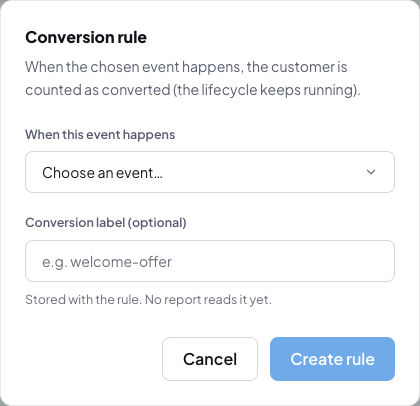
Before you start: the campaign has to be saved. Until then, Stop & conversion is closed and the note says “The other tabs open after the first save.” If When this event happens says “No events in this brand’s catalogue”, install an event pack, then come back.
- Open the saved Lifecycle. Open Stop & conversion.
- Press Conversion rule. The dialog title is Conversion rule. The line under it reads “When the chosen event happens, the customer is counted as converted (the lifecycle keeps running).”
- Under When this event happens, leave Choose an event… and pick the event. The loading line is “Reading the event catalogue…”.
- Conversion label (optional) is a short name you can type, for example the placeholder “e.g. welcome-offer”. The hint under it reads “Stored with the rule. No report reads it yet.” Leave it empty if you do not need a label.
- Press Create rule. The button reads Creating… while it saves, and it stays off until an event is chosen. Cancel adds nothing.
The row title is Conversion. Under it, the event is named after When, and “happens”. If you typed a label, the same line adds “label:” and that text. The footer says how many rules are on this campaign.
Delete on the row menu removes that rule only.
Tip
Data still shows Conv. 30D, Conv. 7D, Conv. 24h and AV. 30D, and Run history has Converted. The optional label is stored on the rule and is not a column on those tiles.
The rule does not count the event that entered the journey. A deposit that starts the campaign is not itself the conversion. The next matching event is.
Warning
A Broadcast has this tab too, but nobody moves through a Broadcast, so a rule there counts no one. When the brand has a conversion attribution policy, the event must also be a paid deposit or order in the brand currency, above zero, and not a reversal.
Warning
A Stop rule is the other button on this tab. That one stops the customer. Conversion rule does not.