Appearance
See which role can do each job. The table is on Team & Permissions, under the member list.
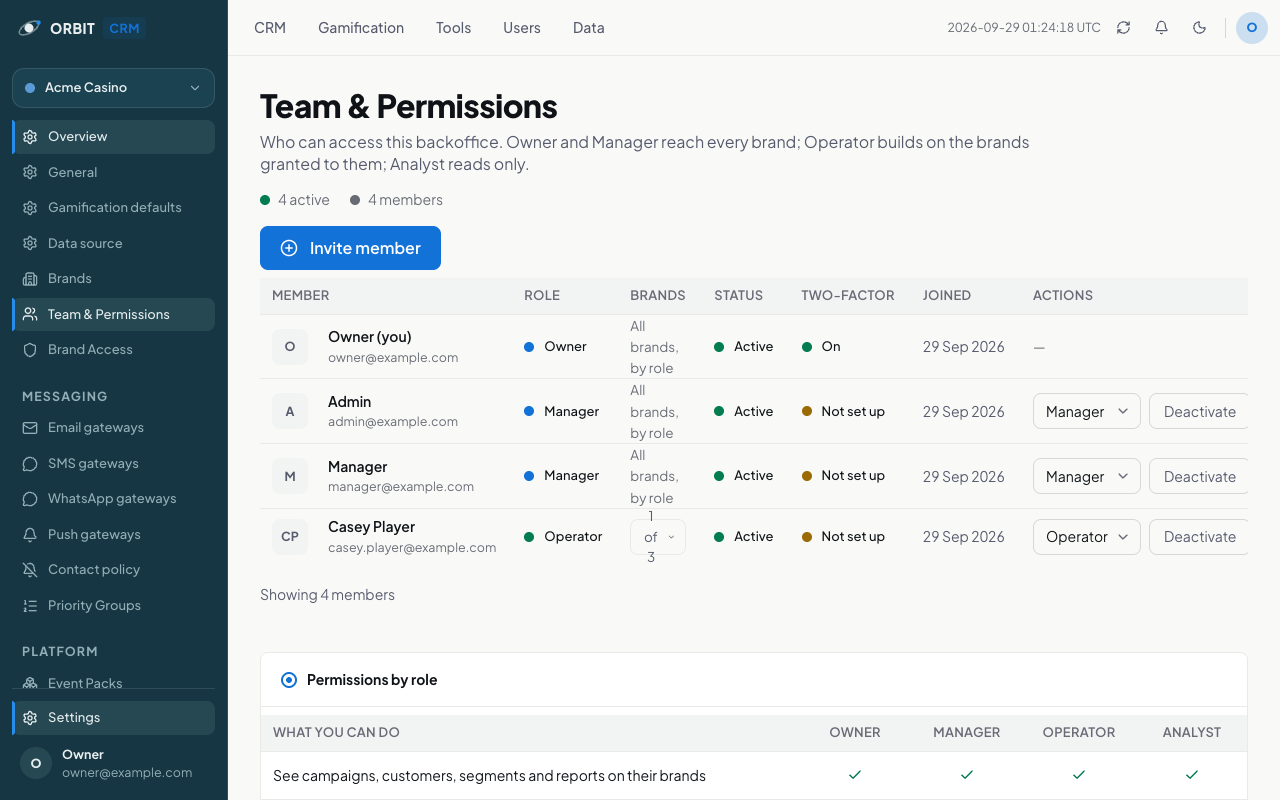
- Open Settings, then Team & Permissions. The title is Team & Permissions. The subtitle says who can access this backoffice, that Owner and Manager reach every brand, that Operator builds on the brands granted to them, and that Analyst reads only.
- Scroll to Permissions by role. The first column is What you can do. The other columns are Owner, Manager, Operator and Analyst. A check is yes. An em dash is no.
- Owner and Manager have a check on every row. Operator has a check on the first two rows only. Analyst has a check on the first row only.
- The rows are: See campaigns, customers, segments and reports on their brands. Build and run campaigns, segments and automations. Reach every brand of the organization without a grant. Edit executable site content: pop-up and inbox HTML, Run JavaScript steps. Manage brands and brand settings: channels, domains, webhooks, data source. Issue and revoke API keys and Front Script keys. Approve Reward Engine and bonus payouts. Invite people, change roles, deactivate, send reset links and reset two-factor. Read the audit log, usage and the Integration guide.
- Under the table, each role has one line. Owner. Everything a Manager can do, on every brand. Holds the organization: the Owner cannot be changed or removed from the Team screen. Manager. Every brand. Invites people and changes roles, manages brands, settings and integrations, edits pop-up and inbox HTML and Run JavaScript steps, and approves payouts. Operator. The brands granted to them. Builds and runs campaigns, segments and automations. No settings, team, keys or executable site content. Analyst. The brands granted to them, read only: campaigns, customers, segments and reports.
The same three lines for Manager, Operator and Analyst are repeated on Invite member. Operator is the role the form opens on.