Appearance
Tile Match is a board players play on your site under Games. They swap neighbouring tiles. The server scores each line and decides whether the target was reached.
Before you start
An Owner or a Manager publishes and turns games on. Status must be Active or publish answers Set the status to Active before publishing.
- Open Gamification, then Mini Games, then Tile Match. Click Create. The screen title for a new one is New game.
- Under Game name, type the name players see. Set Status to Active.
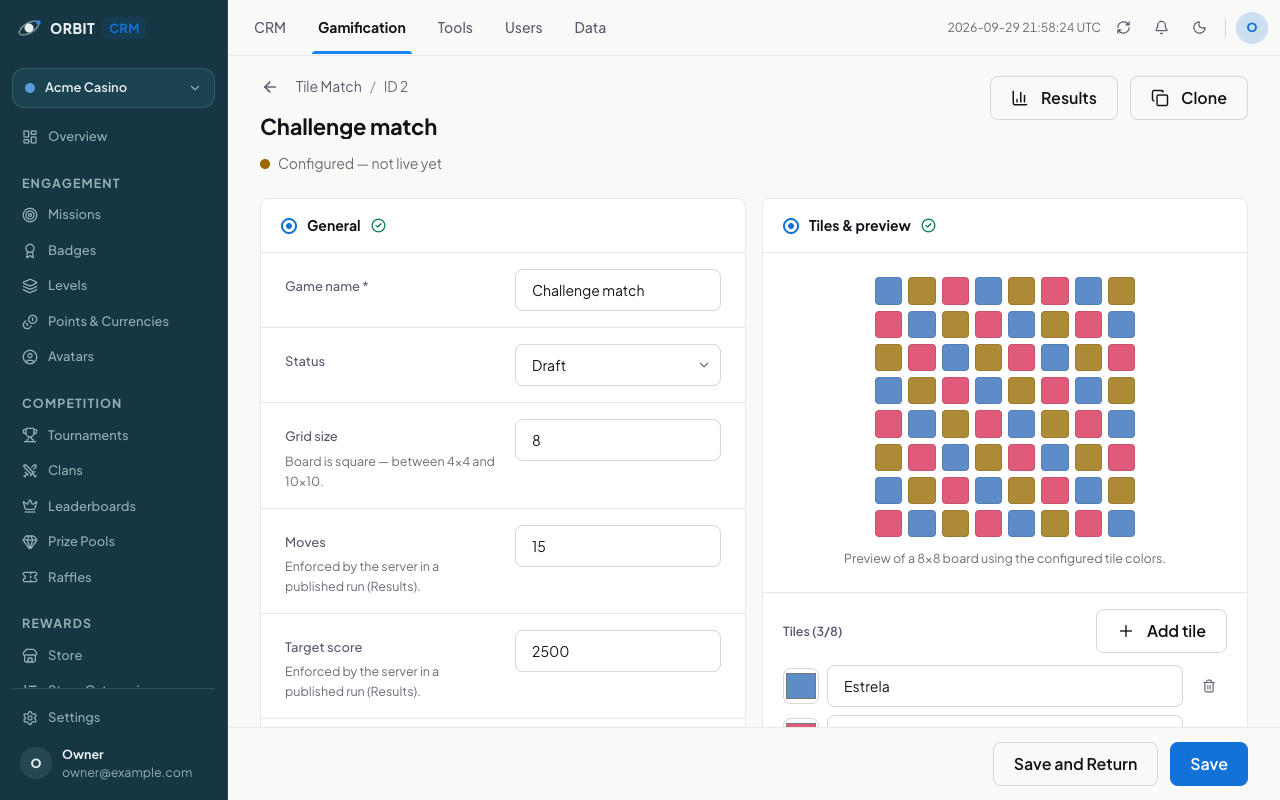
- Set Grid size from 4 to 10. The board is square, from 4×4 to 10×10.
- Set Moves from 1 to 200, Target score, and Points per match. All three are enforced by the server in a published run. Points per match is scored for each line group.
- Open Tiles. Click Add tile until you have at least three tiles. Type each Tile label. Player view shows the board with those colours. With no tiles, the card says “No tiles yet — add one to build the board.”
- Click Save, then Results.
- Click Turn games on for this brand if games are still off.
- Click Publish a run. Set Starts (UTC), Ends (UTC) and Prize release (Approval or Automatic).
- Set Attempts per player. For Reaching the target, choose No prize, Points or Bonus.
- Click Publish. A later change needs a new revision. Publishing freezes these rules.
On the site the card shows Tile Match, Target, the target score, and the number of moves. The player clicks Start. The board shows Score (for example 20 / 100), Moves left, and the tile labels. They pick two neighbouring tiles to swap them. Finish ends the attempt early. The result says Target reached! or Target not reached.
The editor shows Live only while the run is open, games are on, and the end time is still ahead.
Warning
Fewer than three tiles, a grid outside 4 to 10, or a target score below 1 will not publish. Moves and Points per match have to be whole numbers inside the limits above.