Appearance
Load a fixed list of customers from a CSV file and save it as a segment.
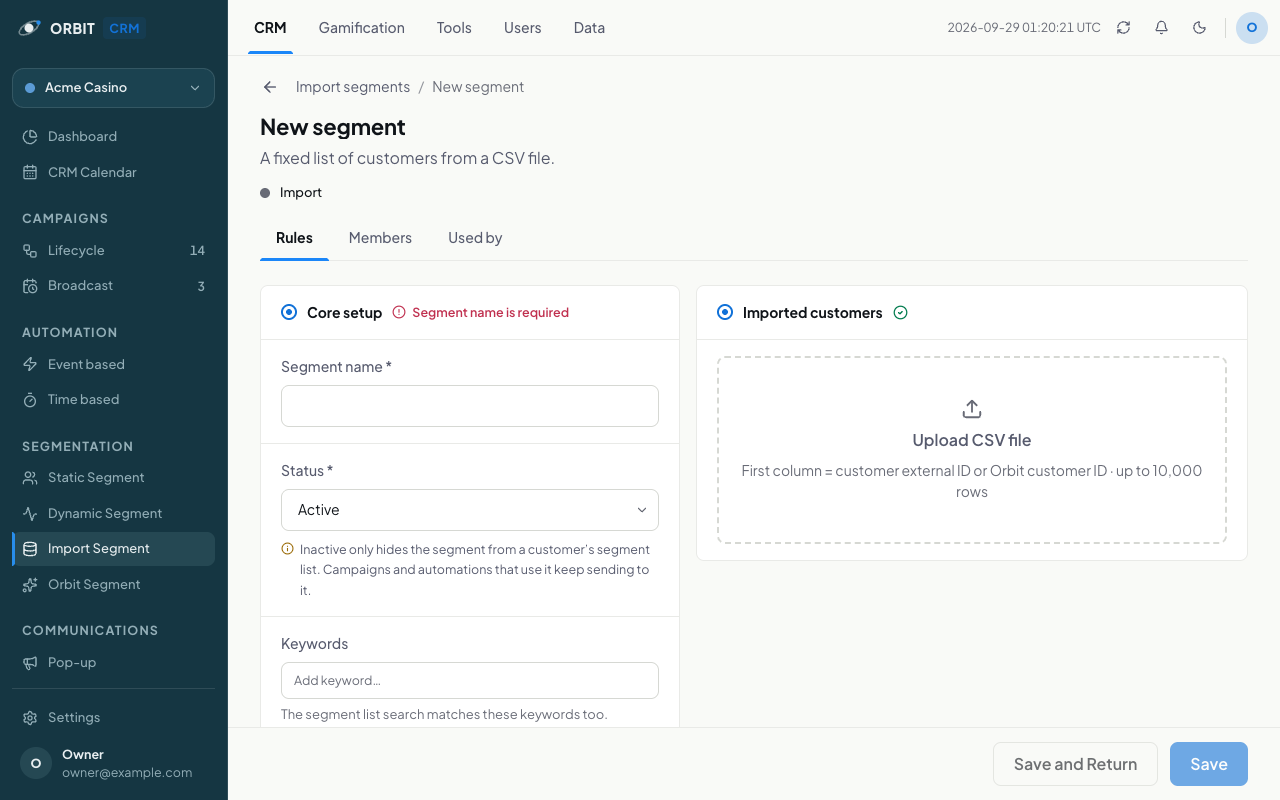
- Open CRM, then Segmentation, then Import Segment. The page title is Import segments. The line under it says “A fixed list of customers from a CSV file.” A file of contacts from a previous platform is a different page. That task is Upload a CSV on a Migrate segment.
- Press Create. The title is New segment. On Rules, type a Segment name. Status can stay Active.
- The card Imported customers has one control, Upload CSV file. The line under it reads “First column = customer external ID or Orbit customer ID · up to 10,000 rows”. The file can be .csv or .txt. Orbit reads the first column of each row, split on a comma, semicolon, or tab. A first-line header such as id, external id, customer id, or user id is skipped. Each value can be at most 80 characters. Duplicates are dropped. A file with more than 10,000 ids is refused, and the card says a list holds at most 10,000 and to split it.
- After a file loads, the card says how many unique customer IDs loaded, and it shows the first few. Press Clear to drop the whole list. The card goes back to Upload CSV file. Save stays off, and the card says Upload the CSV list, until at least one id is loaded.
- Press Save, or Save and Return.
This editor has no Estimate button. The number on the card is how many ids the file contributed, not how many of them exist as customers. After you save, go back to Import segments and read Number of users. That column is how many of those ids match a customer of this brand. A file of 500 ids that matches 12 customers shows 12. If the count could not be made, the cell is a dash, and “see why” appears when a condition was refused.
Members still does not list anyone until you save. On a new segment it says to save first. On an import there is no Estimate on Rules. Use Number of users on the list.
Warning
Clear removes the ids from the form. It does not delete the segment. Save after Clear only if you mean to store an empty list, and an empty list cannot be saved while the card still says to upload one.