Appearance
Attribution opens the Campaign performance page, the same report as Campaign performance in the CRM group. You read revenue attributed to campaigns here: attributed deposits, conversion, sends, channel cost and profit, each against the period before.
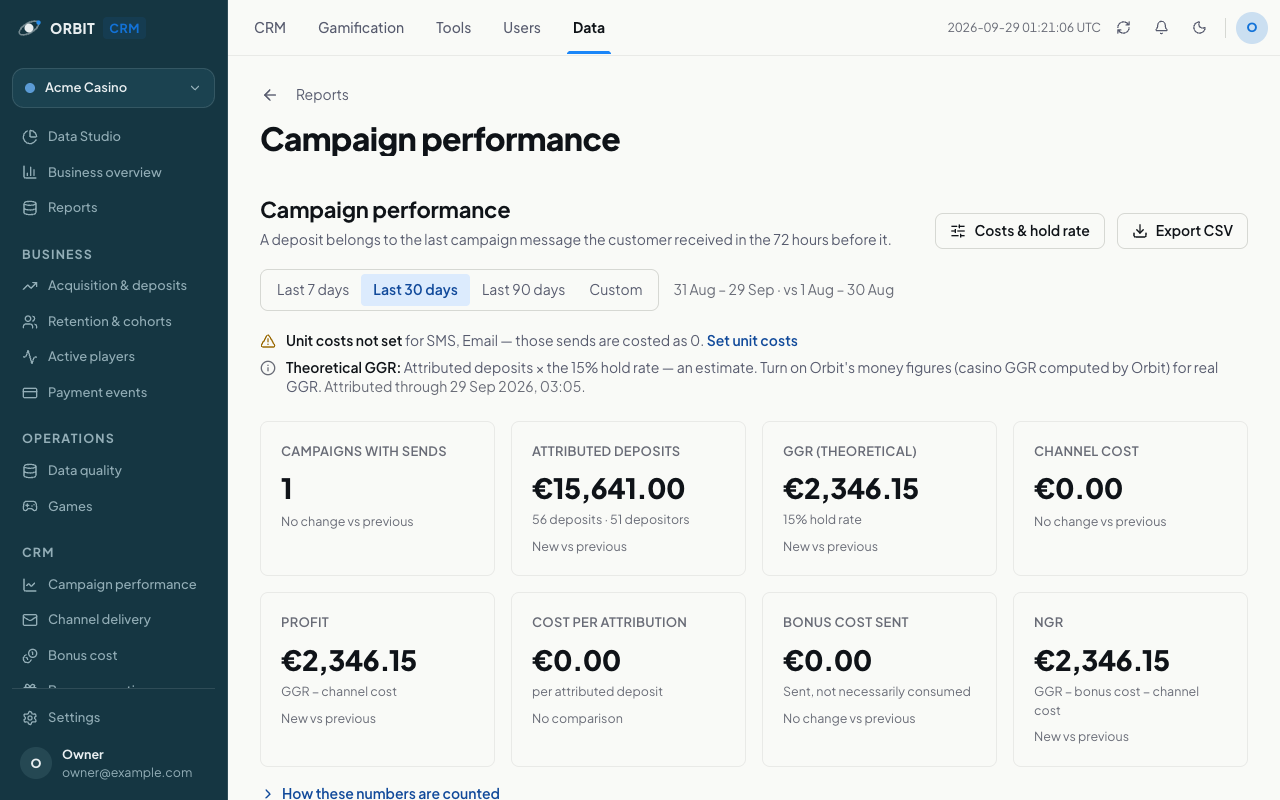
- Open Data, then Customers, then Attribution. The page title is Campaign performance. The crumb is Reports. There is no second attribution screen behind it.
- Set the period with Last 7 days, Last 30 days, Last 90 days or Custom. Custom stacks Start, End, and Apply. The text beside the buttons shows the range and the previous range.
- Read Attributed deposits (or Attributed purchases, on a brand that uses that word). The line under the heading says a deposit belongs to the last campaign message the customer received in the hours before it, unless a conversion setting is already in effect. When that setting is in effect, the line names it and says the campaign duration is from player entry.
- Open How these numbers are counted for the definition of Attribution, Conversion, Channel cost and Profit. Search name or #number finds one campaign. Type is Lifecycle, Broadcast or Realtime. A nested row is Lifecycle step or Connected campaign.
Campaign performance in the CRM group of this same Data menu opens this page as well. Business overview has a Campaign-attributed deposits tile for the overview Period. That tile is a total. This page is the campaign-by-campaign report.
Changing the period here does not change Business overview. Each page keeps its own range.
Tip
If you arrived from Reports, the row you opened is titled Campaign performance, in Area CRM. The side-menu name Attribution is the Customers path to that row’s page.