Appearance
A Lifecycle campaign starts a Connected mission from a Mission step. Several campaigns may start the same mission.
- Open CRM, then Lifecycle, and open the campaign. Open the Flow tab.
- On the bar, open Rewards, or use Search all… and choose Mission. Click Mission. It lands on the canvas. Click that step. The dialog title is Mission. Use a Lifecycle flow. The broadcast bar keeps message steps.
- Mission is required. The box reads Choose a Connected mission…, or No Connected missions yet. The help reads “Only Connected missions can be started from a campaign. Several campaigns may start the same mission; the mission keeps one set of tasks and rewards.”
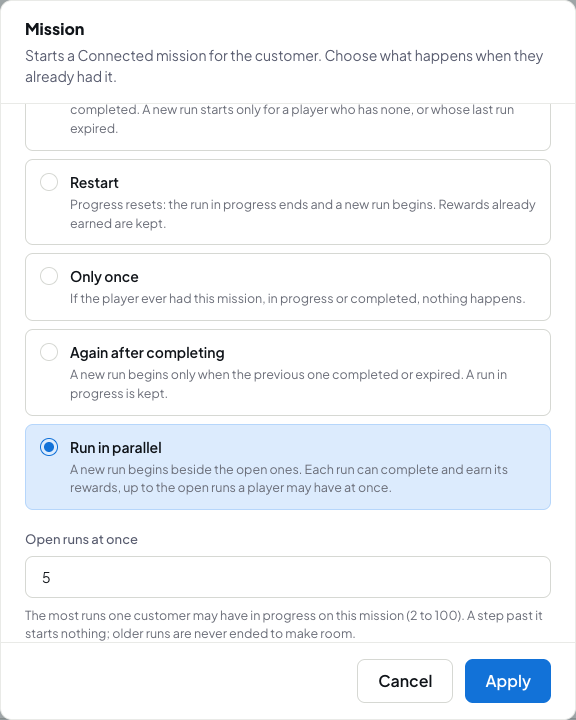
- If the customer already had it lists the same five choices as a Triggered mission. Each sentence says “player”:
- Keep progress (default) — “A run in progress carries on untouched, and a completed mission stays completed. A new run starts only for a player who has none, or whose last run expired.”
- Restart — “Progress resets: the run in progress ends and a new run begins. Rewards already earned are kept.”
- Only once — “If the player ever had this mission, in progress or completed, nothing happens.”
- Again after completing — “A new run begins only when the previous one completed or expired. A run in progress is kept.”
- Run in parallel — “A new run begins beside the open ones. Each run can complete and earn its rewards, up to the open runs a player may have at once.”
- Run in parallel shows Open runs at once. It is a whole number from 2 to 100 and starts at 5. The hint reads “The most runs one customer may have in progress on this mission (2 to 100). A step past it starts nothing; older runs are never ended to make room.”
- A step saved before these choices can show “This step was saved with an older reset choice that never ran. It keeps progress until you choose an option here.”
- Press Save flow. It reads Saving…, then Saved. Main’s Save leaves this drawing as it was.
Warning
“This mission is archived. Choose another before the campaign goes live.” A step that does not name a Connected mission of this brand says “This step names a mission that is not a Connected mission of this brand. Choose one below.”