Appearance
Active players splits the period into casino, sportsbook, the overlap between them, reactivation and churn. The page title is Active players. The heading under it reads Active players on a gaming brand, and Active customers on any other.
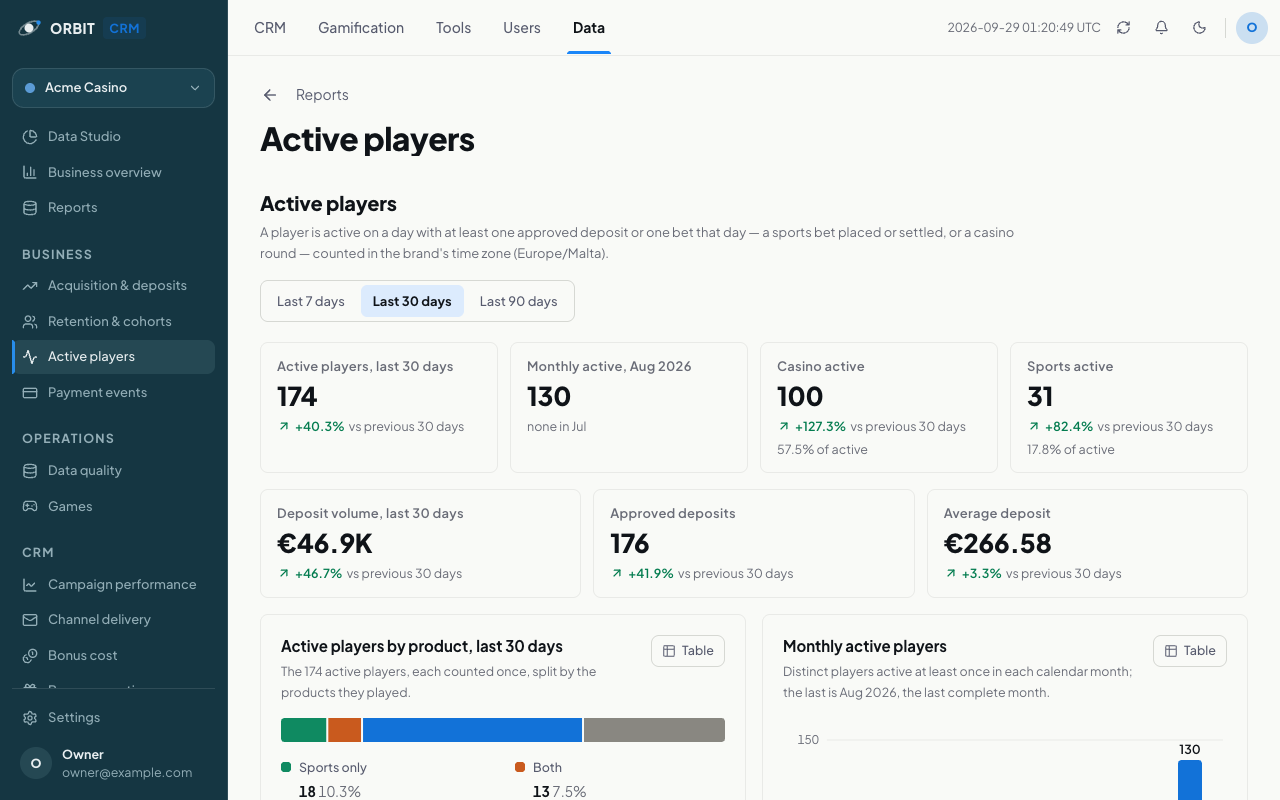
- Open Data, then Business, then Active players. The crumb Reports takes you back to the report list.
- Set the period with Last 7 days, Last 30 days or Last 90 days. This page owns that control. It opens on Last 30 days.
- Read the first row: Active players, last 7 days, last 30 days or last 90 days; Monthly active with the month name; Casino active; and Sports active. The Monthly active title calls that month the last complete month. Casino active is casino only plus both. Sports active is sports only plus both.
- Read Active players by product. Each active player is counted once. The parts are Sports only, Both, Casino only, and Neither product. The table adds Neither: deposit only and Neither: other play.
- Read the daily series New to active, Reactivated and Churned. The note under the chart says what each one is. New to active is the player’s first active day. Churned is the first day after the stated number of days without activity. Reactivated is a player active again after that gap.
A player is active on a day with at least one approved deposit or one bet that day — a sports bet placed or settled, or a casino round — in the brand’s time zone. The time zone is printed in the subtitle.
If the brand has no gaming catalogue, the page says No activity to count for this brand and that purchases and orders are not part of this figure. If the history has not been built, it says The activity history has not been built yet. While a rebuild is running, a yellow line says the figures are partial.
Warning
On Business overview and on Retention & cohorts, this same block follows the page Period, and these three buttons are hidden. Open this menu item when you want Last 7 days, Last 30 days or Last 90 days on their own.