Appearance
See the month of scheduled broadcasts, and which of those days will really send.
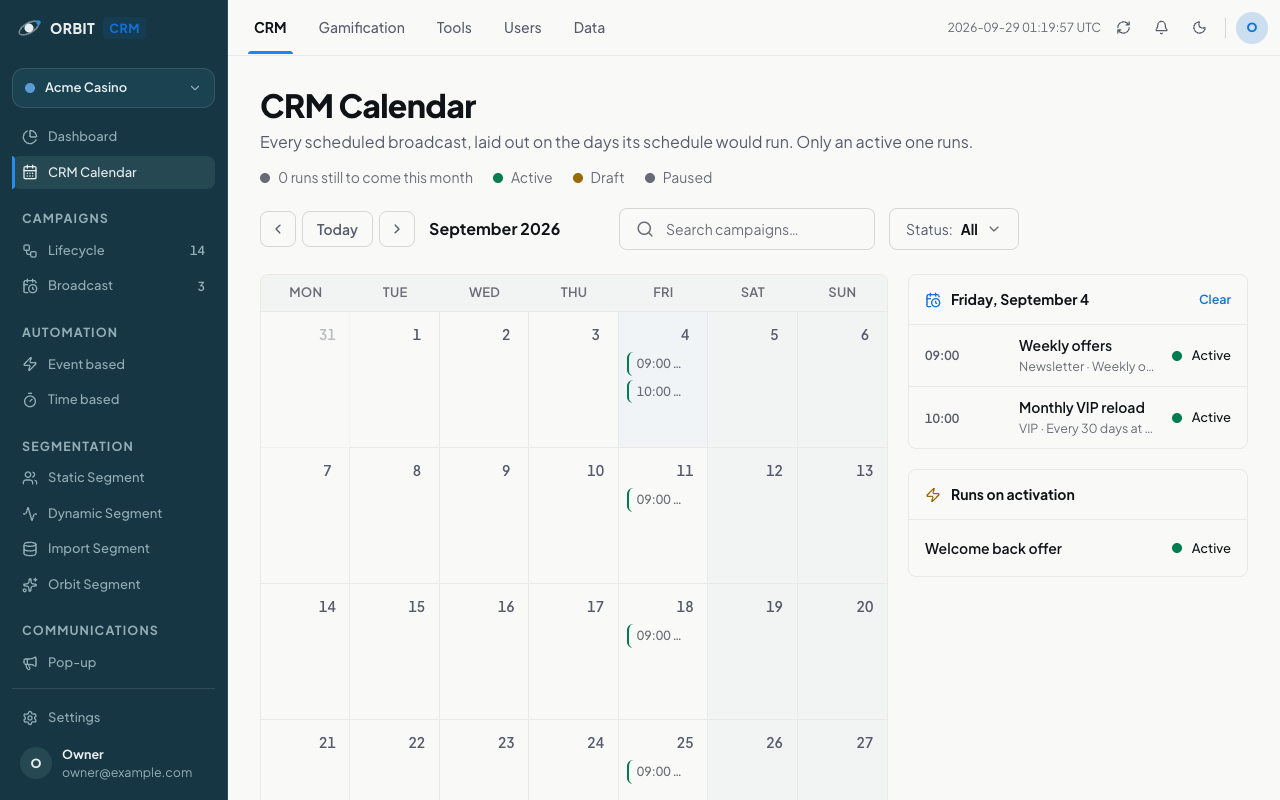
- Open CRM, then CRM Calendar. The title is CRM Calendar. The line under it says every scheduled broadcast is laid out on the days its schedule would run, and that only an active one runs.
- The month name sits beside Today. Previous month and Next month move the grid. Today jumps back to the current month. Days start on Monday.
- Search campaigns… narrows the grid by name. Status can be Active, Draft, or Paused. With Status left open, drafts are painted too.
- A day shows up to three broadcasts, with the UTC time and the name. A fuller day adds “+N more”. Click the day to fill the side list with that date. Click a name to open that broadcast. Clear returns the side list to Upcoming runs.
- The count in the header, “N runs still to come this month”, and the list Upcoming runs, include only Active broadcasts whose next slots are still ahead. A draft can sit on a day and still not run.
- Broadcasts set to Send now do not take a day on the grid. When any exist they collect under Runs on activation. Each row is the name and the status, with no time under the name. They send when the broadcast is Active, not on a calendar day.
An empty Upcoming runs list says “No upcoming runs — activate a scheduled campaign.” A selected day with nothing on it says “No runs on this day.”
Warning
Painting a broadcast on a day does not send it. Status has to be Active, and the slot has to fall inside its Active dates and days and before any stop date. Slots outside that window are left off the grid.