Appearance
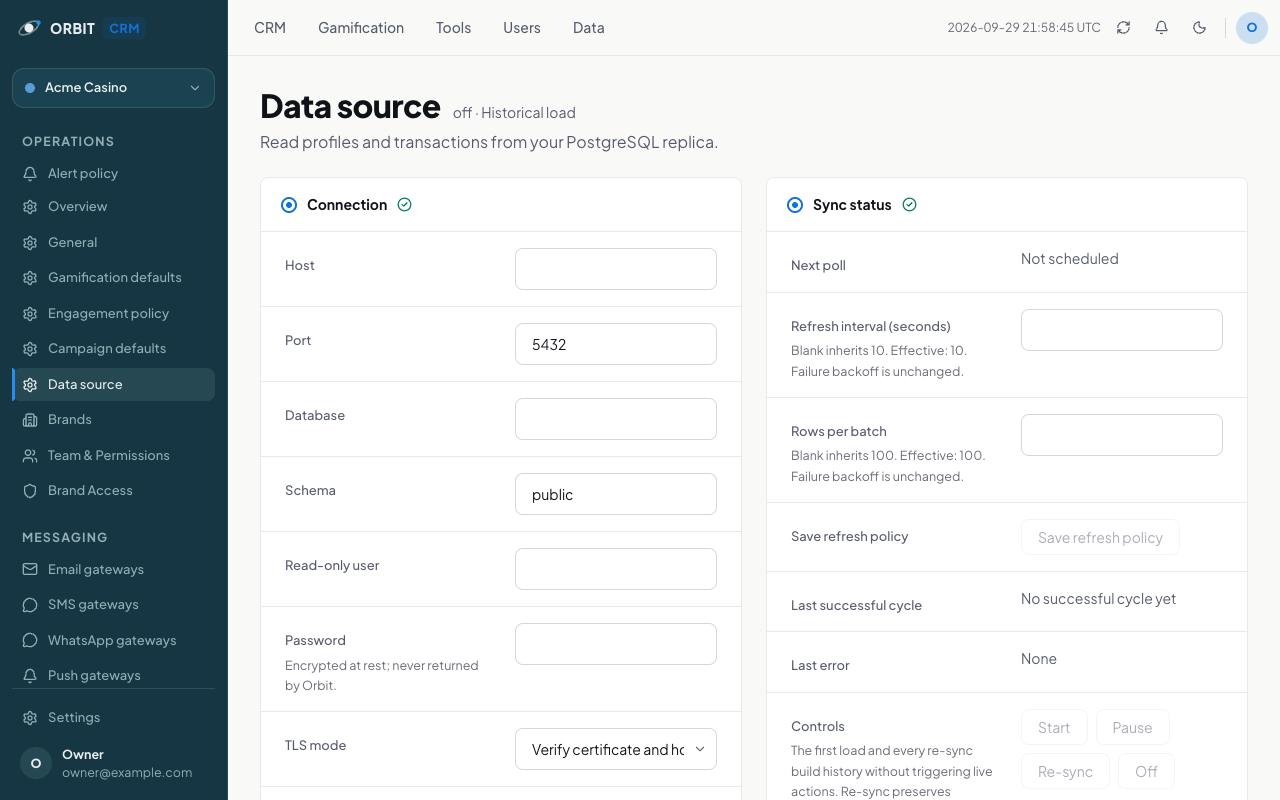
Refresh interval (seconds) is how often a running data source reads the next batch. It lives on Data source, under Sync status, and it is separate from the connection fields on the left.
Before you start
An Owner or a Manager can change the interval. A connection has to be saved already: Save refresh policy stays off until one is. Your Orbit admin can find the integration guide under Tools.
- Open Settings, then Data source, and select the brand.
- On Sync status, read Next poll. It shows the next time, or Not scheduled.
- Set Refresh interval (seconds). Blank inherits 10. The field accepts 10 to 3600. Effective shows the number in use. The hint says failure backoff is unchanged: a failing cycle still waits longer before the next try.
- Rows per batch is on the same card and is saved by the same button. Blank inherits 100. The field accepts 1 to 500. Change it only when you mean to change how many rows one cycle reads.
- Click Save refresh policy.
- Read Last successful cycle. It shows a time, or No successful cycle yet. Last error shows None when the latest cycle had no error.
The status next to the title is the source's own word, such as running, next to Historical load or Live. A source that is running and whose last success is older than Data source failure age (minutes) can raise Data source failing. That age is on Alert policy.
Warning
The connection fields lock while the status is running, but Refresh interval (seconds) and Rows per batch do not. You can save them without pausing.
Tip
Controls says the first load and every Re-sync build history without triggering live actions. Changing the interval does not start a re-sync.