Appearance
Create stores a mission for the active brand and sets the status that decides whether customers can progress in it.
- Open Gamification, then Engagement, then Missions.
- The header shows how many are active out of 500, how many more can go live, and how many missions the current filters show. Search by name or ID… matches the private name, the public name, or the numeric ID (the @ is ignored). Status and Type narrow the list. Refresh reloads it.
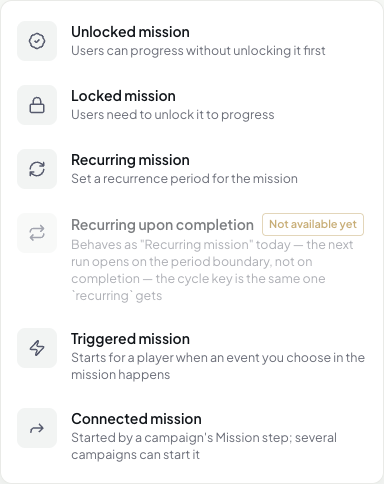
- Click Create. The menu offers six rows. Five can be chosen:
- Unlocked mission — “Users can progress without unlocking it first”.
- Locked mission — “Users need to unlock it to progress”.
- Recurring mission — “Set a recurrence period for the mission”.
- Triggered mission — “Starts for a player when an event you choose in the mission happens”.
- Connected mission — “Started by a campaign's Mission step; several campaigns can start it”.
- Recurring upon completion stays on the menu with Not available yet. It cannot be selected.
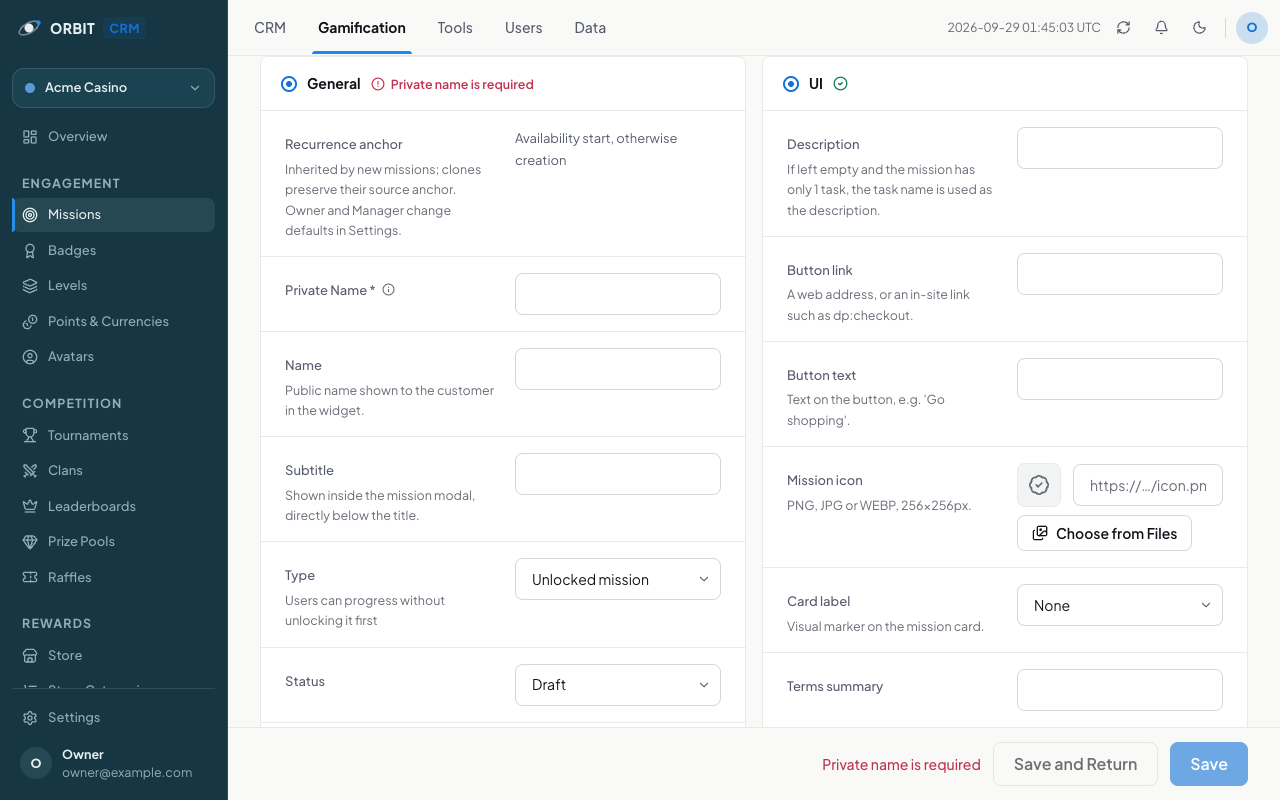
- On General, Private Name is required. Only your team sees it. Name is the public name shown to the customer. Status is Draft, Active, Paused or Archived.
- Who can take part starts at All users. Pick a segment when only that segment should progress.
- For a Recurring mission, set Recurrence period as a number plus Days, Weeks or Months. The hint says the mission restarts on this cadence.
- Save keeps you on the mission and shows Saved. Save and Return goes back to the list. An Active mission with no tasks is blocked with “Active missions need at least one task”.
On the list, a row opens the mission.
A mission saved earlier as Triggered mission is a Connected mission now. On a saved Connected mission, Start is Started by, and that hint ends with “Progress players already had is kept.” The list column Started by does not.
Warning
A new mission does not show Players must join first or Players claim the reward. They appear only when a saved mission already has them on, so they can be switched off. The first hint says “Not enforced yet: players progress, and are rewarded, without opting in.” The second says “Not enforced yet: rewards are granted automatically when the mission is completed.”
With runs, the notice says “The type cannot change to or from a Triggered or Connected mission while the mission has runs.” Clone the mission and give the copy the new type. The runs stay on this one.