Appearance
Replace the authenticator from Security when you still have a way to prove it is you.
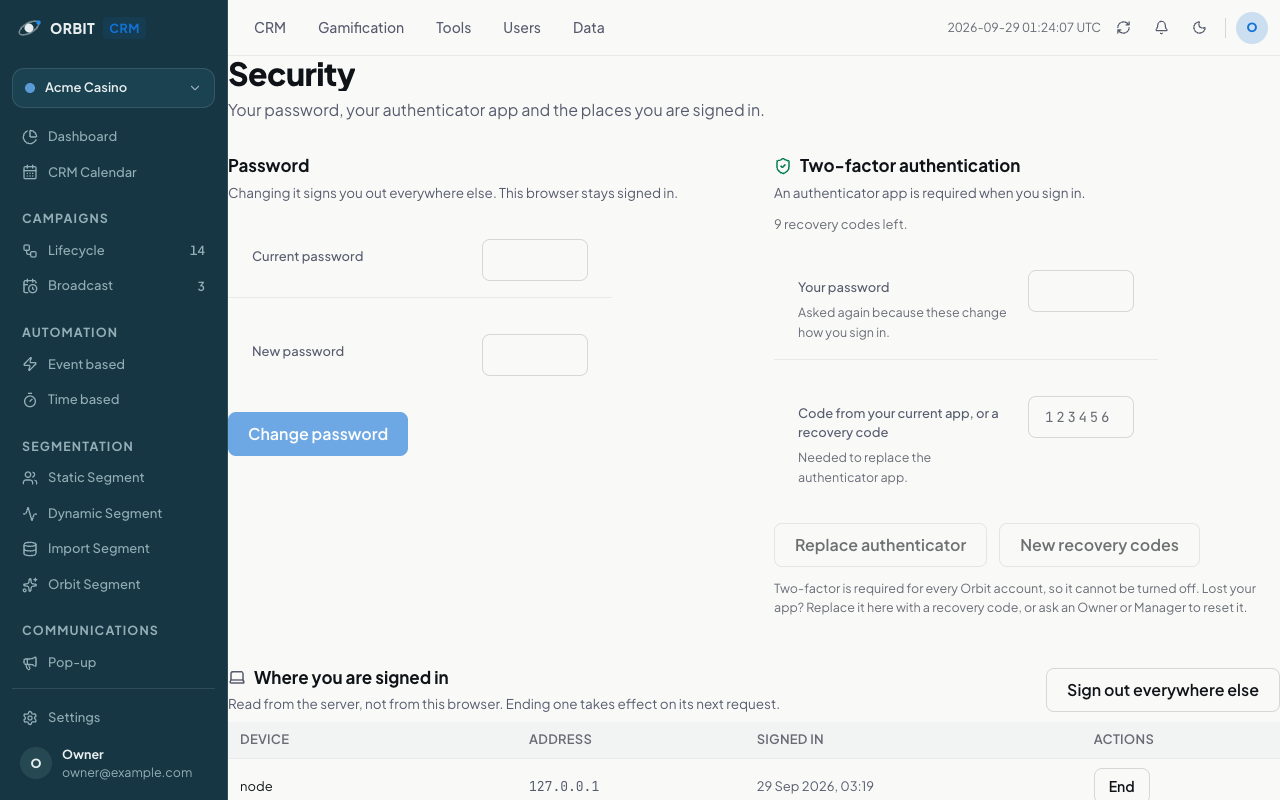
Before you start: two-factor is required and cannot be turned off. Turn off is not offered.
- If you are still signed in, press your initials at the top, then Security. The title is Security. The card is Two-factor authentication. It says an authenticator app is required when you sign in, and how many recovery codes are left.
- Your password is asked again, because these change how you sign in. That is not your current password means the password did not match.
- If recovery codes are left, type one in Code from your current app, or a recovery code, then press Replace authenticator. If none are left and you are signed in, press New recovery codes after Your password. Keep the new list. Each code works once, and it is shown only now. Codes from the earlier list no longer sign you in. Use one new code in the field, then press Replace authenticator.
- The page says to scan this with the new authenticator app, then enter the code it shows. Your current app keeps working until you confirm. The line under the image is Cannot scan? Enter this key in the app instead: and the key sits under that line. Code from the new app, then Confirm new app. That code is not right. Use a code from the new app means this code did not match the new app.
- The page says New authenticator app confirmed. The old one no longer works. Keep the new recovery codes. Each works once, and they are shown only now. Cancel before you confirm leaves the old app in place. If a new app was started and not confirmed, your current app still works. Replace again to see a new QR code.
If you are signed out, a recovery code still finishes Two-factor. With none left, you cannot replace the app yourself. Reset 2FA is never on your own row. An Owner resets a Manager, an Operator or an Analyst who belongs only to this organization and is not Orbit staff. A Manager resets an Operator or an Analyst on those same terms. Orbit staff resets the Owner, anyone in another organization, and an Orbit staff account. At the next sign-in you set up a new authenticator app.
The line under the buttons says: Lost your app? Replace it here with a recovery code, or ask an Owner or Manager to reset it.