Appearance
Reports is the list of reports for the active brand. Search, filter by Area, and press Open to go to that report. The block under the list is not a set of results you can open.
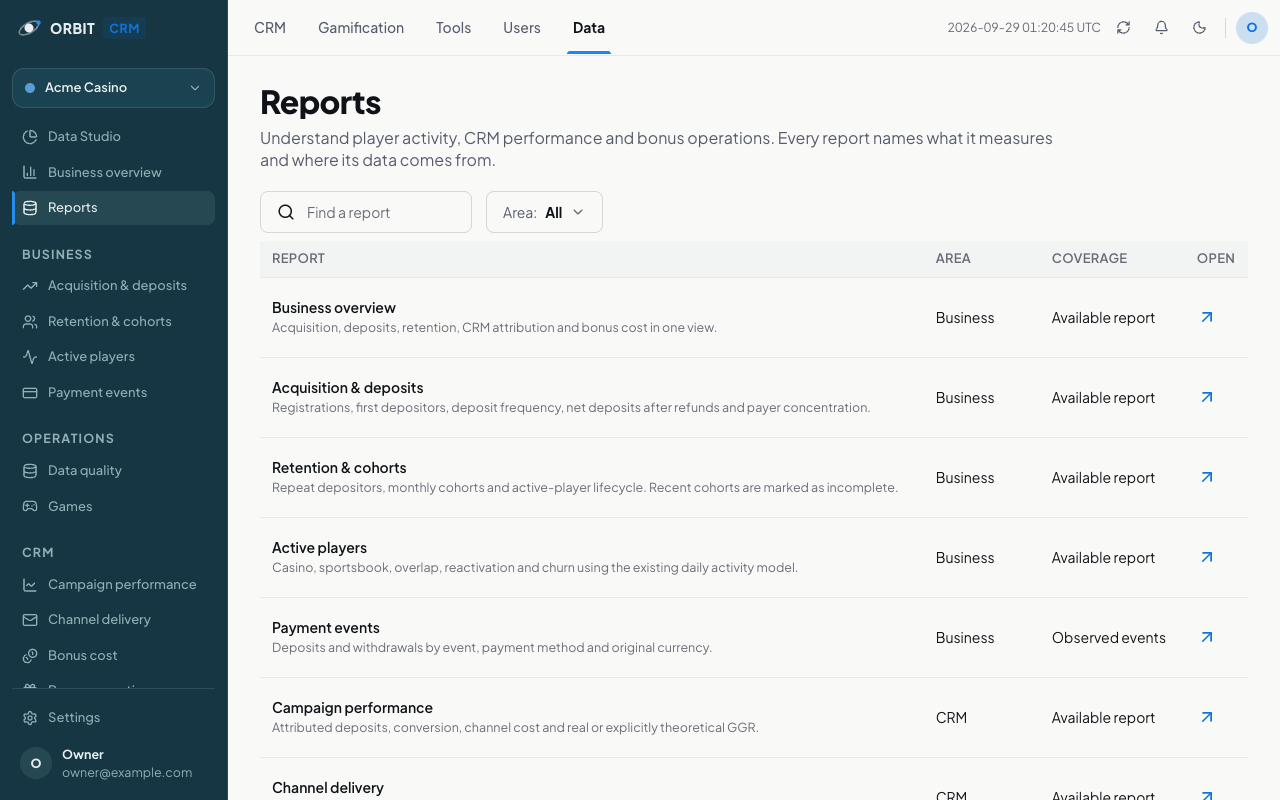
- Open Data, then Reports. Data Studio, the item above Business overview, is a different screen: it builds boards. This page is the report list. The title is Reports. The subtitle says the page is there to understand player activity, CRM performance and bonus operations, and that every report names what it measures.
- Type in Find a report. The search matches the report name and the line under it.
- Open Area when you want one group. The first choice is All. The groups on this list are Business, CRM, Bonuses, Players, Engagement and Operations. Those names are the Area column, not a second copy of the side menu. Bonus cost and Bonus operations sit in Bonuses. RFM analysis, Value score and Product preference sit in Players. Missions through Clans sit in Engagement.
- Read Coverage. A report you can open says Available report, unless that row prints another state. Payment events says Observed events. Product preference says Current snapshot. Raffles and Clans say Setup inventory.
- Press the row, or the Open icon at the end. The icon’s name is Open plus the report name.
The footer counts the rows and says one brand at a time. If nothing matches, the table says No reports match these filters.
Under the list, Next reporting capabilities names work that is not available yet. The line under the heading says these need additional source data or measurement contracts, and they are not presented as available results. The columns are Capability and What must exist first. Nothing in that table opens a report.
Tip
The side menu still opens each report directly. Reports is the place to see Coverage before you open one. Campaign performance is listed once. Attribution, under Customers, opens that same report. Data quality reads a daily rollup of the last seven days.