Appearance
See how the active brand stands on consent, and which answers changed recently. Orbit does not change consent on its own.
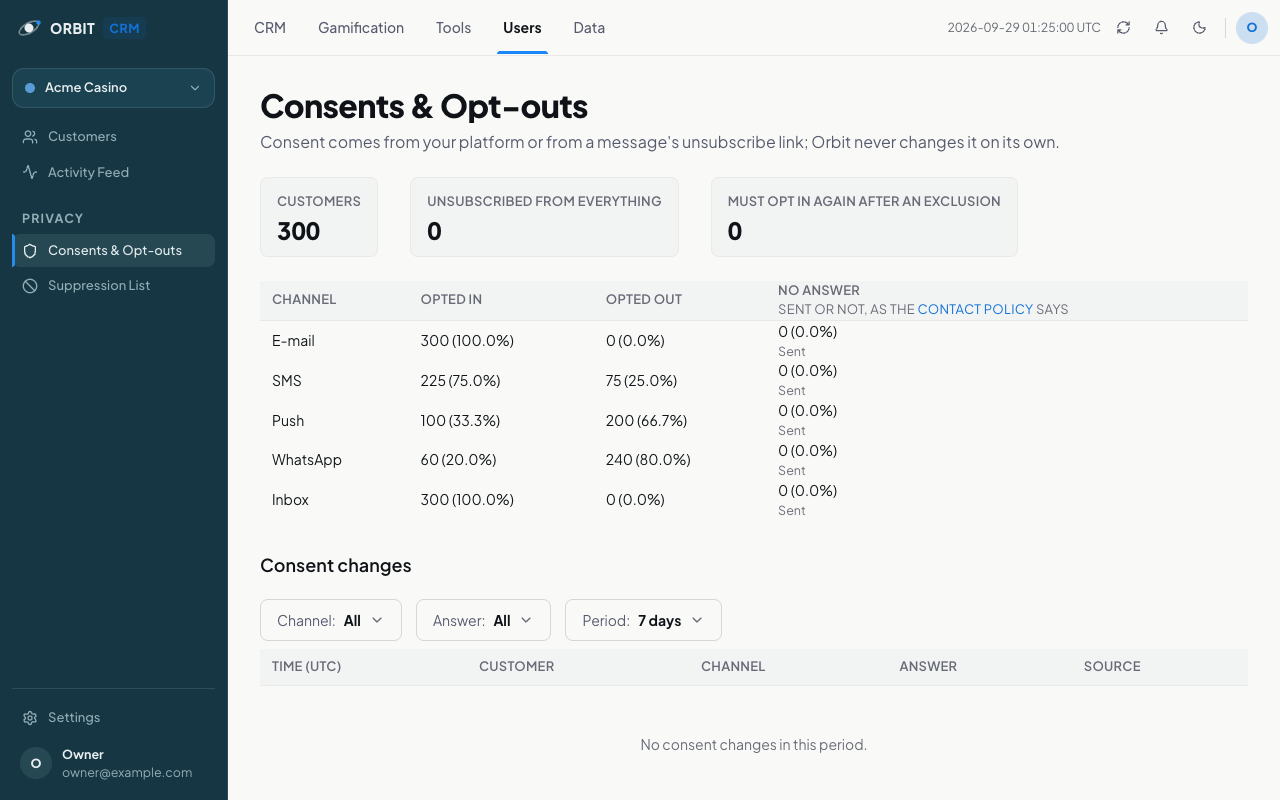
- Open Users, then Privacy, then Consents & Opt-outs. The title is Consents & Opt-outs. The subtitle says consent comes from your platform or from a message's unsubscribe link, and that Orbit never changes it on its own. With no brand, the page says Select a brand to see its consents.
- Three counts sit above the table: Customers, Unsubscribed from everything, and Must opt in again after an exclusion.
- The channel table columns are Channel, Opted in, Opted out and No answer. The channels are E-mail, SMS, Push, WhatsApp and Inbox. Each cell is a count and a share of Customers. Under No answer the header says “Sent or not, as the contact policy says.” Each row then says Sent or Not sent.
- Consent changes is the list under that table. When this brand has a horizon, a line above the list reads “This brand keeps {n} days of raw event history.” Why consent changes mention the history limit reads the rest of that line. Channel filters E-mail, SMS, Push, WhatsApp, Inbox and All channels. Answer filters Granted, Withdrawn and No answer. Period offers 1 days, 7 days, 14 days and 31 days. It opens on 7 days.
- The change columns are Time (UTC), Customer, Channel, Answer and Source. A customer name opens that profile. With no name, the link is the external ID, or View customer. No linked customer means the change has no profile. Unknown channel means the channel was not one of the named ones. An unreadable answer prints “Unreadable (read as a refusal)”. No consent changes in this period means the filters matched nothing.
- Press Load more when the button is there. While the next page loads it reads Loading….
This list is not where you set an opt-out. The answer arrives from the platform or from the unsubscribe link.