Appearance
Engagement policy is what the gamification engagement model uses whenever it runs: the weight of each feature, the activation track, and the store points floor. Whether the model runs at all is Mode on General, under Gamification engagement. This page does not switch that mode.
Before you start
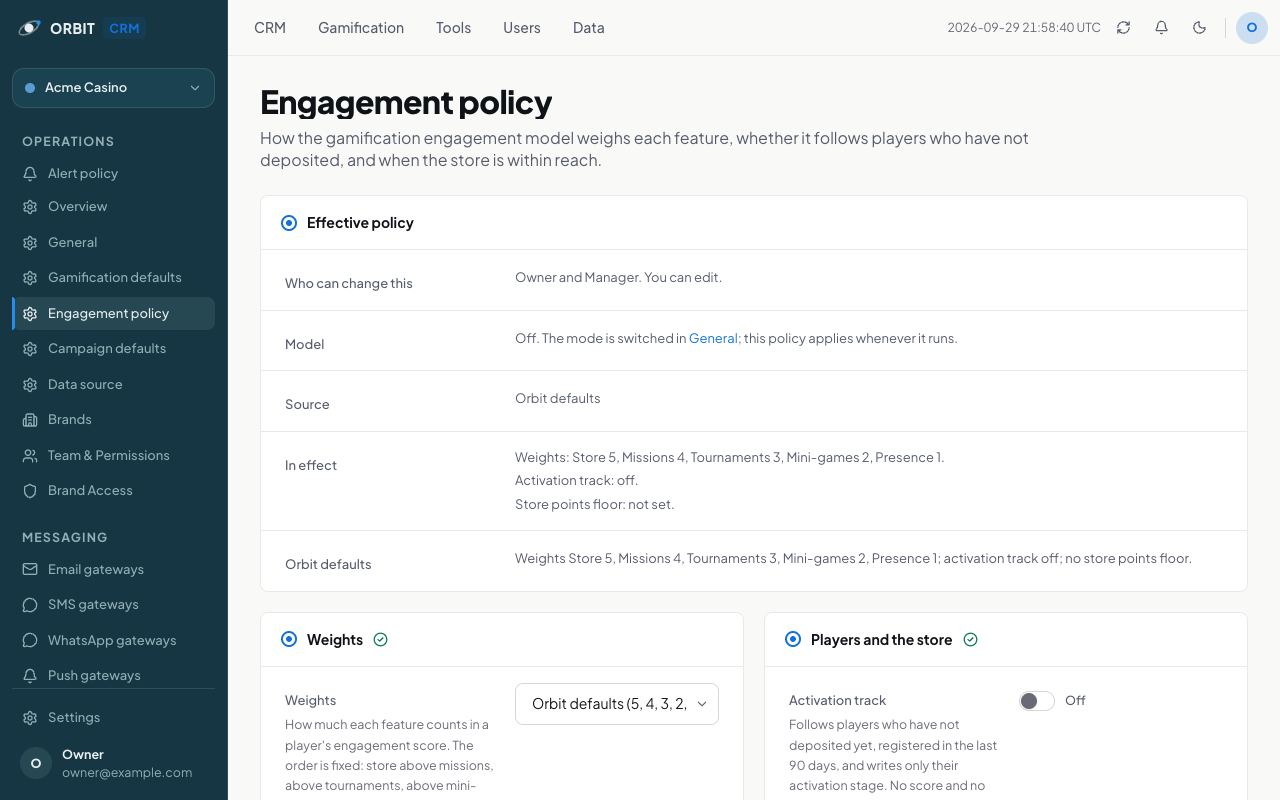
Who can change this names Owner and Manager. While the Predictive models add-on is off, this page is read-only. Model shows Off, Shadow — computes, writes nothing to profiles, or Live — writes to profiles, and links to General. Source says Brand policy or Orbit defaults.
- Open Settings, then Engagement policy.
- Read In effect. It lists Weights, Activation track on or off, and Store points floor as not set or a point count. A stored override the model refuses appears as Stored override ignored, the default stands: plus the reason.
- Orbit defaults are weights Store 5, Missions 4, Tournaments 3, Mini-games 2, Presence 1, activation track off, and no store points floor. The Weights menu shows that as Orbit defaults (5, 4, 3, 2, 1).
- Choose Custom to type weights. The order is fixed: Store above Missions, above Tournaments, above Mini-games, above Presence (badges, levels, leaderboards), above 0. Each weight accepts 0.01 to 1000, with up to 2 decimals. A broken order is marked Order broken, and the line names which feature must weigh more than the next.
- Set Activation track to On or Off. On follows players who have not deposited yet, registered in the last 90 days, and writes only their activation stage. No score and no suggestion.
- Set Store points floor. Empty is Not set: a store that is not in Orbit is never within reach this way. A number means a player with at least that many points counts as able to buy. The hint says a store in Orbit uses its cheapest points item instead. The field accepts 1 to 1000000000.
- Click Save policy. The page says Saved. The model uses it from its next run. Discard changes drops the draft.
Warning
Save policy stays off while the weight order is broken or a number is out of range. Choosing Orbit defaults again clears a custom weight set before you save.
Tip
A stored weight set that the model ignores is shown as the defaults it falls back to, with the reason under In effect.