Appearance
Create a broadcast that sends one message to a segment, once or on a repeat, and only after it is Active.
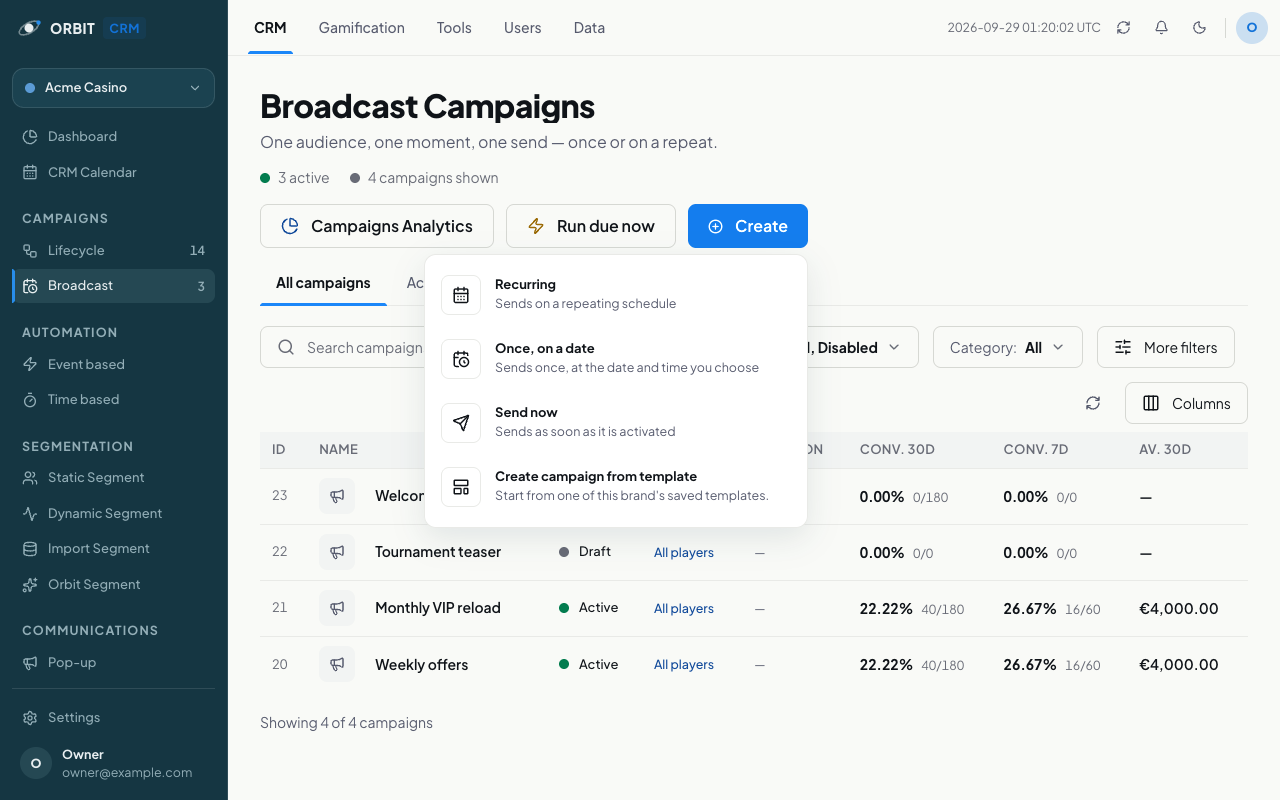
- Open CRM, then Campaigns, then Broadcast. The page title is Broadcast Campaigns.
- Press Create. Three schedule rows are in the menu. Recurring says “Sends on a repeating schedule”. Once, on a date says “Sends once, at the date and time you choose”. Send now says “Sends as soon as it is activated”. Create campaign from template says “Start from one of this brand's saved templates.” and opens the Broadcast templates list. To start from a saved one, you can also open Templates, then Broadcast, and press Use this.
- Pick Recurring, Once, on a date, or Send now. Orbit opens New broadcast campaign on the Main tab. The crumb is Broadcast Campaigns, then New. The other tabs stay off until the first Save. Nothing is stored if you leave without Save. Scheduling starts on the row you picked. You can still change it on Main.
- Campaign name is required. Status is Draft until the campaign exists. Scheduling is required. Recurring is Daily or Weekly. Daily reads Every, a number, day(s) at, a time, and UTC. Weekly asks for weekdays, then at and a time in UTC. Once, on a date reads On, a date, at, a time, and UTC. Send now repeats “Sends as soon as it is activated.” Press See next runs for the next times, or “No upcoming runs with the current configuration.”
- Segment says Choose a segment… and Required while it is empty. A long list opens a search box, Search…. No match means nothing fits. Maximum audience per run starts at 100000.
- Press Save. Flow then opens. A Broadcast created now is a scheduled entry into the same journey as a Lifecycle, so later steps run. An older Broadcast that is still exactly one batch message keeps Sending speed, and a step after that single send is marked “Never runs on a broadcast”. A Migrate broadcast stays on that single send. See Run a broadcast as a journey.
- Set Status to Active and press Save, or open More and press Activate campaign. Until it is Active, Run due now will not send it. Pause campaign sets Paused.
Priority group (observational), under Advanced Settings, only appears when a broadcast already has one saved. It offers No priority, Critical, High, Medium, and Low. The menu stays disabled on No priority. The note under it says it is not used yet: campaigns are not ranked by priority, so every campaign that reaches a customer sends. Priority Groups is where those groups and the same-day overlap are listed.