Appearance
Build a segment from what customers did, and see who matches before a campaign uses it.
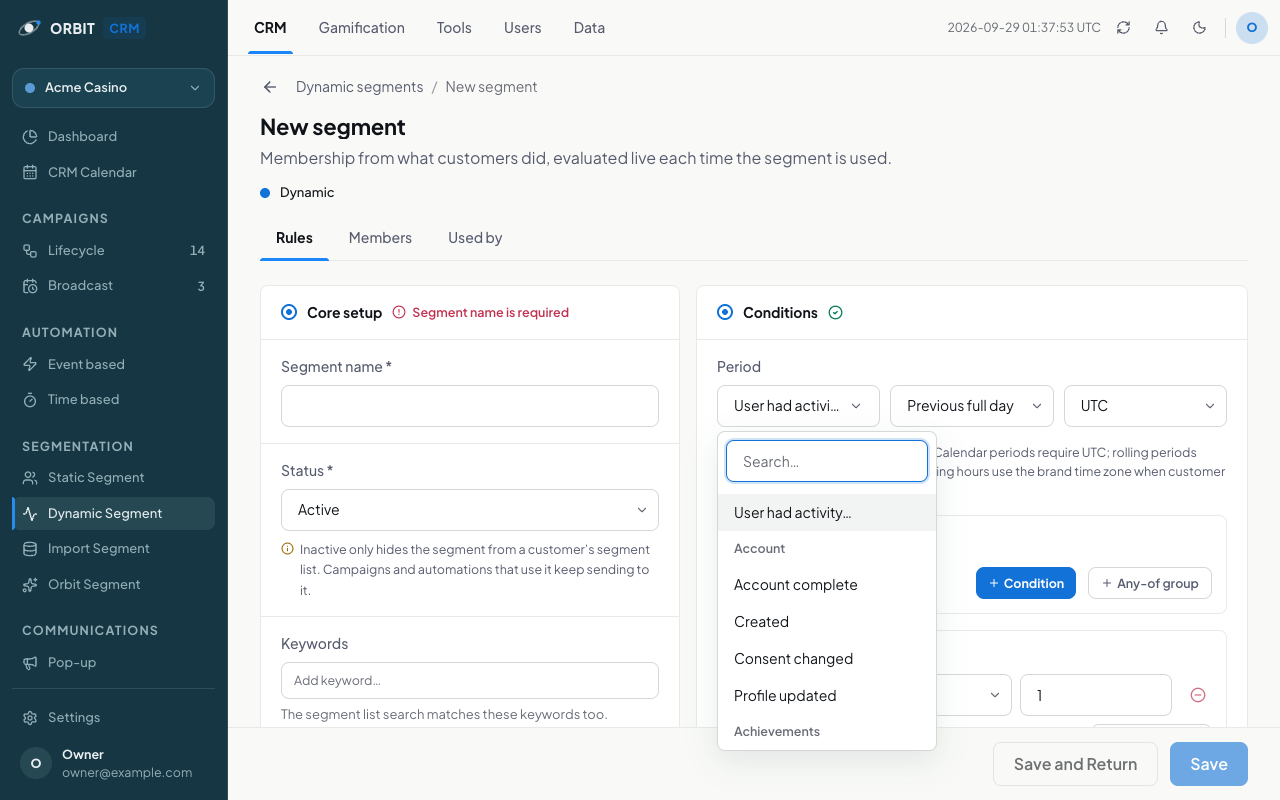
- Open CRM, then Segmentation, then Dynamic Segment. The page title is Dynamic segments. The line under it says membership comes from what customers did, evaluated live each time the segment is used.
- Press Create. The title is New segment. Stay on Rules.
- The card Conditions starts with Period. The first menu is User had activity…, or “No events in this brand’s catalogue” when the brand has none. Pick the event. A long list opens a search box, Search…, and keeps its groups. No match means nothing fits. The next menu is the period: Previous full day, Last 7 days, Last 30 days, Last 90 days, Current month, or Previous month. The third menu is UTC or “Customer time zone (unavailable for calendar periods)”. Under the menus: “Customer time zones are not stored. Calendar periods require UTC; rolling periods ignore the time zone. Campaign sending hours use the brand time zone when customer time is requested.”
- Event conditions narrows that event. Qualifying total adds Number of matching events or Total value of matching events, an operator, and a value. The placeholder on the value is “Use integer value, e.g. 3”. Press + Condition to add another total. Customer details is the profile check, the same + Condition and Any-of group rows as on a Static segment. A money amount there is in the brand currency. A date property prints the day under the box. The note reads “A day picked is the whole day in the brand's time zone.” See Pick dates in conditions and filters.
- Press Estimate, next to Audience size. That button sends the Customer details conditions only. It does not apply the activity event or the period. The line is who matches those profile conditions right now. After you Save, the list column Number of users is the live membership, event and period included.
- The note at the bottom of the card says membership is evaluated live each time the segment is used, so a change applies from the next use. It also says a large time window is heavier to evaluate.
- Press Save. On a saved segment, Recalculation (saved, not used) appears under the conditions, locked. The note says nothing recalculates this segment on a schedule. Membership is evaluated live each time the segment is used.
Members is the same as on a Static segment: save first to list customers, then the empty state says this segment selects no customers now. Estimate on Rules is still only the profile conditions.
For a property that stores a date and time, exactly N days ago matches the whole calendar day in the brand’s time zone. For example, on Thursday, exactly 2 days ago matches Tuesday from midnight up to Wednesday at midnight. A date-only property, such as birth date, counts back from today’s date in UTC. Enter a whole number from 1 to 36,500 days. A day-count rule can also use hours, from 1 to 23, for day 0. See Pick dates in conditions and filters.