Appearance
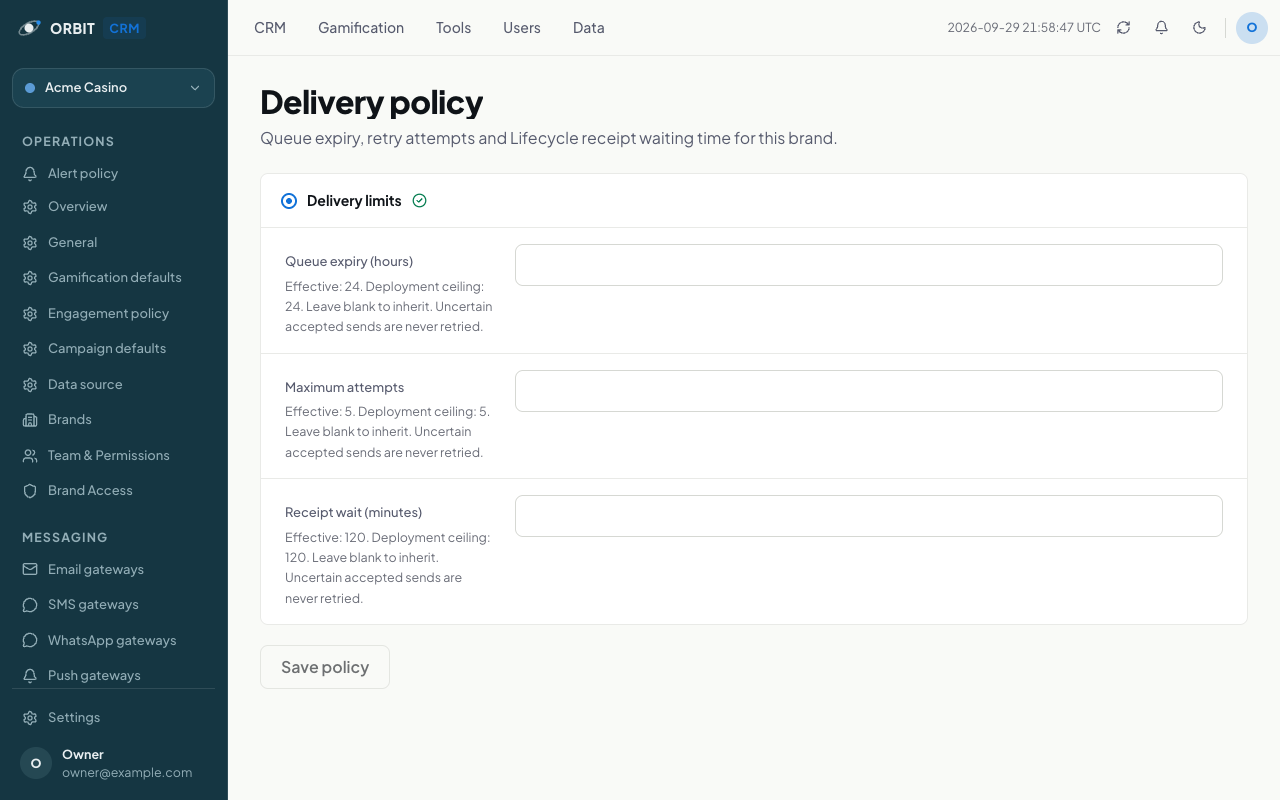
Delivery policy sets three limits for this brand. A blank field inherits the deployment ceiling. A number above that ceiling is refused on save.
Before you start
An Owner or a Manager can change the fields. Anyone else sees the effective numbers.
- Open Settings, then Messaging, then Delivery policy.
- Under Delivery limits, read Effective and Deployment ceiling on each row.
- Set Queue expiry (hours). A send that is still queued after this many hours is cancelled and is not sent. The field accepts 1 to 168, and never above the deployment ceiling.
- Set Maximum attempts. When a provider does not take a send, Orbit tries it again up to this many times, then stops. The field accepts 1 to 50, and never above the deployment ceiling. The row says uncertain accepted sends are never retried.
- Set Receipt wait (minutes). The page calls this the Lifecycle receipt waiting time. After a send is queued, the flow waits this long for the receipt. The field accepts 1 to 10080, and never above the deployment ceiling.
- Leave a field blank when that limit should stay the deployment ceiling.
- Click Save policy. The page says Saved.
The line under the title reads Queue expiry, retry attempts and Lifecycle receipt waiting time for this brand.
Warning
Save policy stays off while a number is outside its range, or while nothing has changed. A value above the deployment ceiling is out of range for the field, so it cannot be saved.
Tip
If the page says Delivery policy could not load., use the retry on that line. If it says Select a brand., choose the brand first.