Appearance
Clear a member’s authenticator so their next sign-in asks them to set up a new one.
Before you start: the page shows Requires the Manager role unless you are an Owner or a Manager. You cannot reset your own two-factor. Use Replace authenticator on your Security page.
- Open Settings, then Team & Permissions. The Two-factor column reads On or Not set up.
- Find the member. Your row, and the Owner row, show an em dash in Actions. Reset 2FA is not there. The Owner’s two-factor can only be reset by Orbit staff.
- On a Manager’s row, Reset 2FA is shown only when you are the Owner. Only the Owner can reset a Manager’s two-factor. On an Operator or an Analyst, an Owner or a Manager sees Reset 2FA. The hover says it clears this member’s authenticator app so they set up a new one.
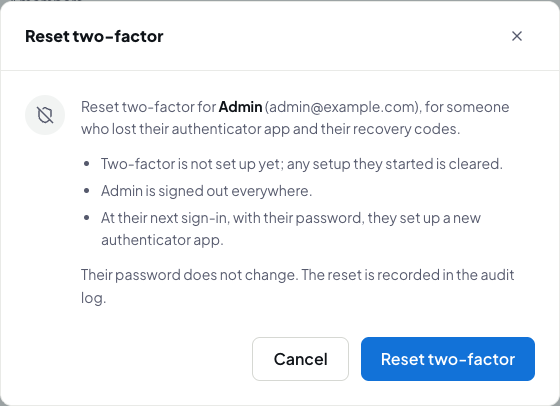
- Press Reset 2FA. The dialog title is Reset two-factor. It names the person and the email, for someone who lost their authenticator app and their recovery codes. It says their authenticator app and recovery codes stop working, or that two-factor is not set up yet and any setup they started is cleared. They are signed out everywhere. At their next sign-in, with their password, they set up a new authenticator app. Their password does not change. The reset is recorded in the audit log.
- Press Reset two-factor. While it runs, the button reads Resetting…. Cancel closes the dialog without a reset. The title then becomes Two-factor reset. It says how many sessions they were signed out of, and that they set up a new authenticator app at their next sign-in. Press Done. The row reads Not set up.
This user also belongs to another organization. Remove them from this organization instead means the reset did not run. Remove is the separate action on the row.
Warning
The member’s password stays as it is. Reset link is the button that sets a new password. Reset 2FA does not.