Appearance
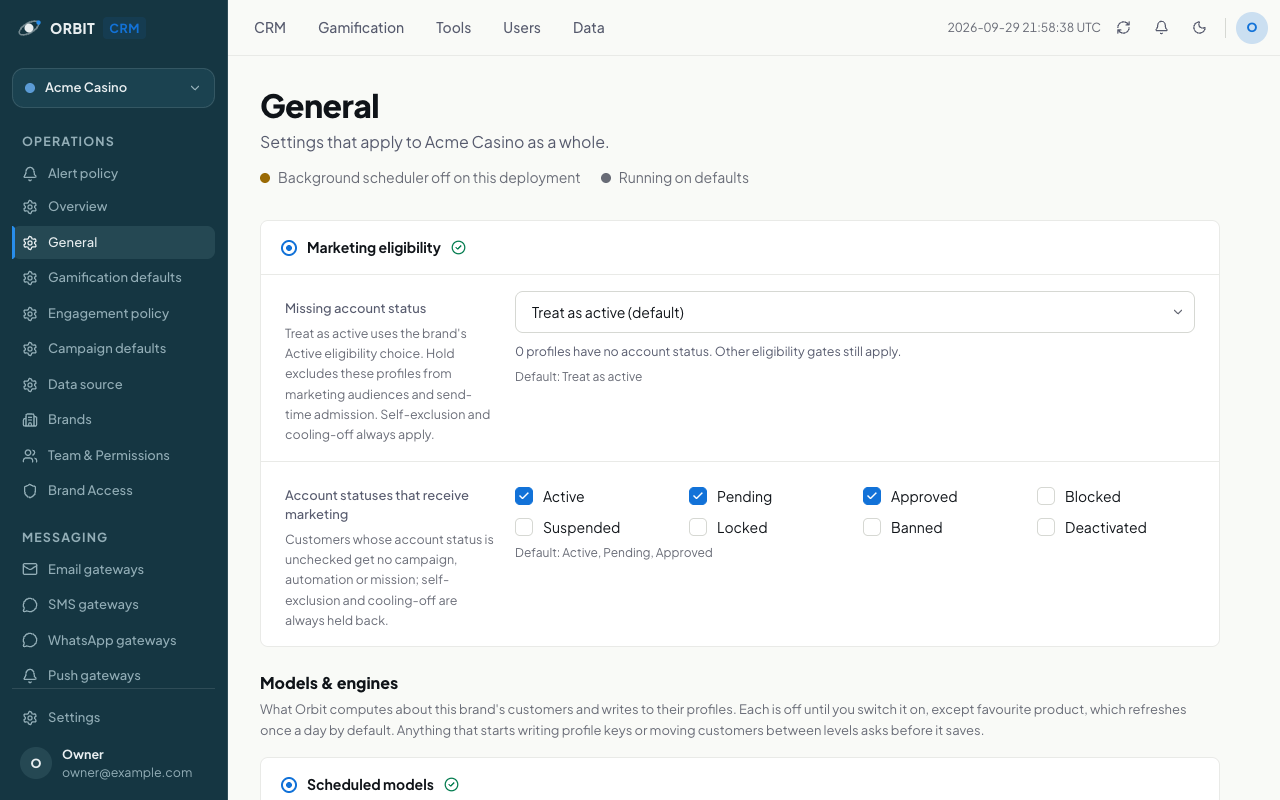
Missing account status is for profiles that have no account status at all. It sits on General, under Marketing eligibility, next to Account statuses that receive marketing.
Before you start
An Owner or a Manager can change it. The choice is saved as soon as you confirm it. It does not wait for another button.
- Open Settings, then General, and select the brand.
- Under Marketing eligibility, open Missing account status.
- Choose Treat as active (default) or Hold from marketing.
- Treat as active (default) asks Treat missing status as active? The body says profiles without account status may receive marketing when Active is eligible, and that self-exclusion and cooling-off still apply. Click Treat as active to confirm.
- Hold from marketing saves without that question. Those profiles are left out of marketing audiences and out of send-time admission.
- Read the count under the field. It says how many profiles have no account status, and that other eligibility gates still apply. If the count cannot be read, the line says Preview unavailable.
The hint on the row says the same split: treat as active uses the brand's Active eligibility choice, and hold excludes these profiles. Self-exclusion and cooling-off always apply, on either choice.
Account statuses that receive marketing is the list for profiles that do have a status. An unchecked status gets no campaign, automation or mission. A missing status is not a box on that list. It follows Missing account status only.
Warning
Holding a missing status does not replace self-exclusion or cooling-off. Those still hold a customer back when the missing status is treated as active.
Tip
Under the field the row always says Default: Treat as active. When you choose Hold from marketing, it adds the tag Changed on this brand.