Appearance
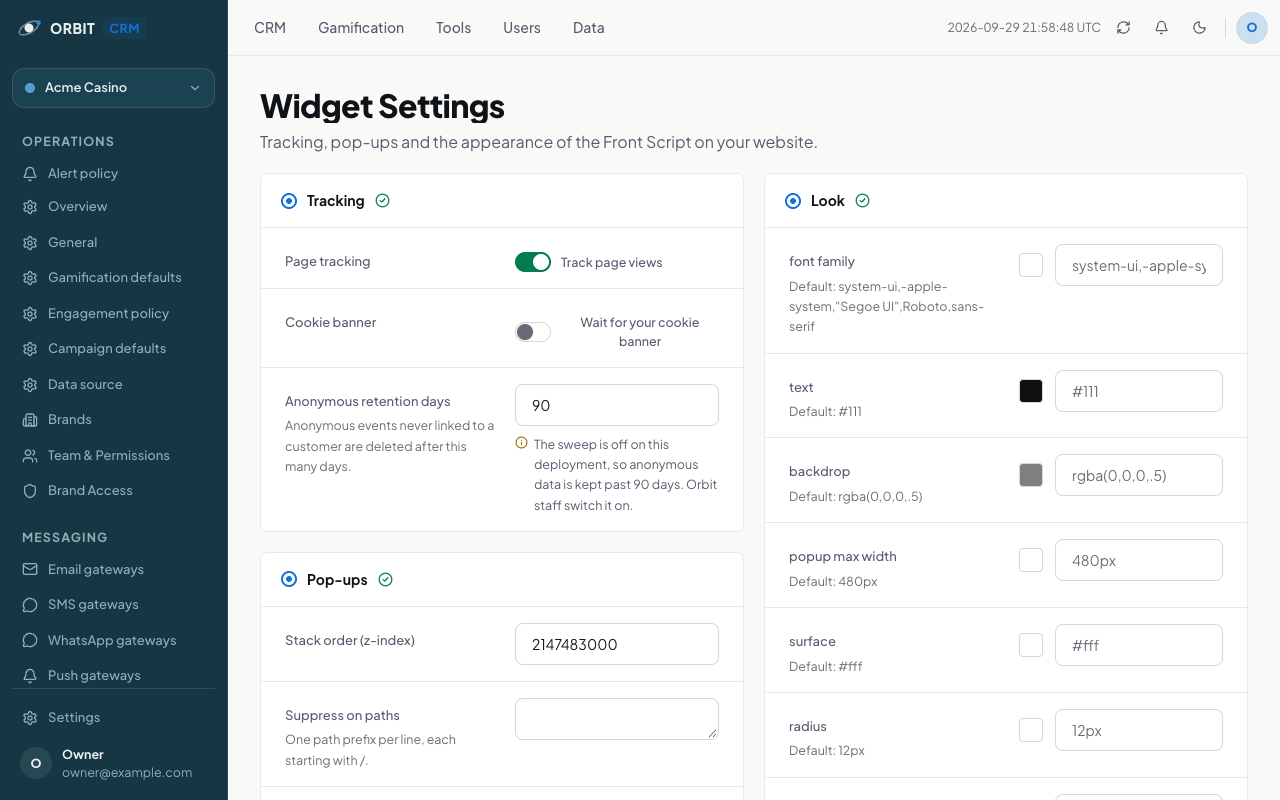
Anonymous retention days is how long Orbit keeps anonymous events that were never linked to a customer. The lines under the field say whether that cleaning is actually running on this deployment, and when it last ran for this brand.
Before you start
An Owner or a Manager can change the days. Anyone else sees Owners and Managers change these. Open Settings, then Platform, then Widget Settings. The card is Tracking.
- Read Anonymous retention days. The field accepts 30 to 180.
- Read the lines under the box.
- The sweep is off on this deployment, so anonymous data is kept past the number of days. Orbit staff switch it on. The days you typed are not being applied.
- Last cleaned, a time, and when events were removed, anonymous events removed. The sweep runs every a number of minutes.
- The sweep runs every a number of minutes and has not cleaned this brand yet. The sweep is on, and this brand has not had a pass.
- Oldest anonymous event kept: a time. This appears when an anonymous event is still stored.
- Change Anonymous retention days when you want a different promise, then click Save. The corner says Saved. Saving the days does not start a sweep. Orbit staff switch the sweep on.
The subtitle of the page is Tracking, pop-ups and the appearance of the Front Script on your website. The retention row is only the anonymous events. It does not change how long a known customer's events are kept.
Warning
A yellow mark on the first line means the sweep is off. Anonymous data is kept past the days in the box until Orbit staff switch the sweep on.
Tip
If the lines are missing, the page has not reported a cleaning status for this brand yet. The days field is still the promise you can save.