Appearance
Points & Currencies opens a page titled Loyalty transactions. It splits earned and redeemed units by loyalty currency, separate from cash, for the dates you set.
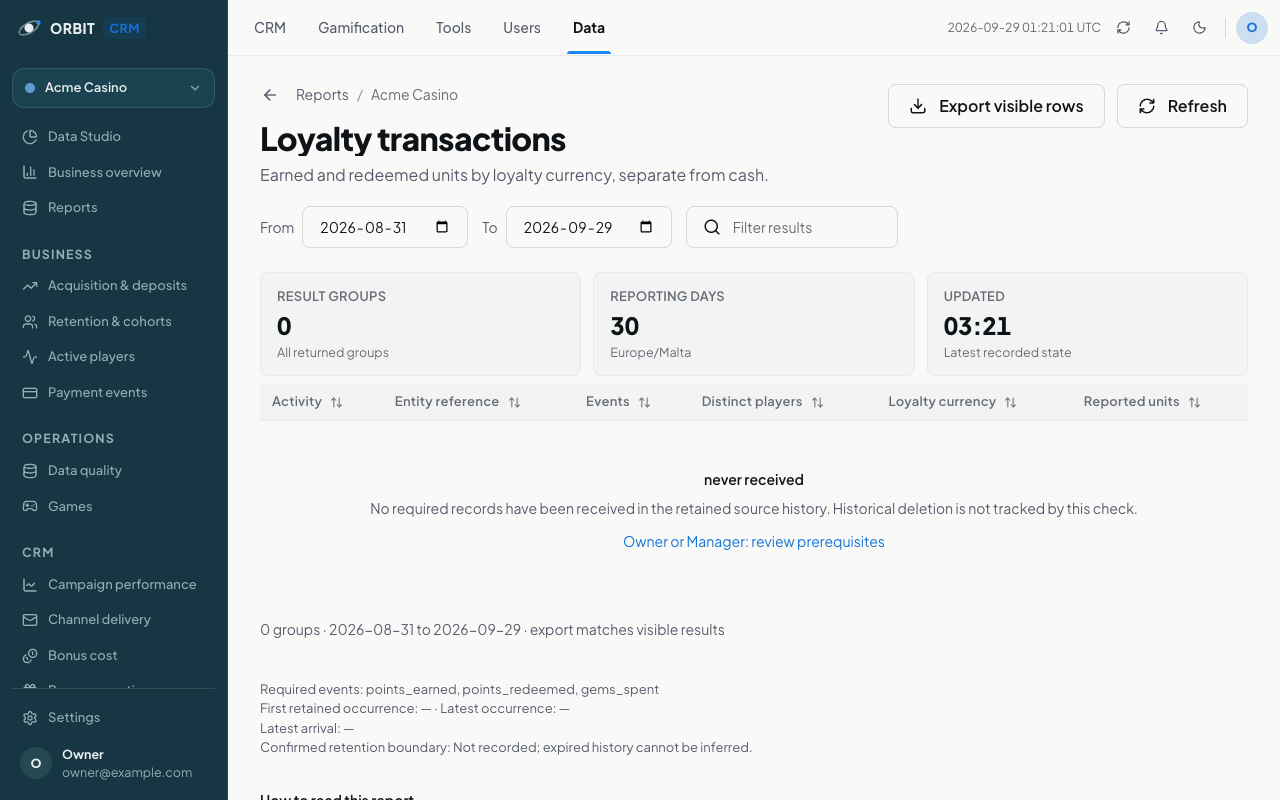
- Open Data, then Gamification, then Points & Currencies. The title on the page is Loyalty transactions. The subtitle says earned and redeemed units by loyalty currency, separate from cash.
- Set From and To within 1 to 93 days. The page starts on the last 30 days through today. Choose between 1 and 93 days. appears when the span is outside that.
- Press Refresh. Use Filter results to search, and press a column name to sort.
- Press Export visible rows for the rows on screen.
Beside Activity, Entity reference, Events and Distinct players, this report adds Loyalty currency and Reported units. Activity includes points earned, points redeemed, and gems spent. Loyalty currency names the currency on the event. Reported units are the amounts on those events.
How to read this report says reported units are event amounts, not a reconciled balance. Earned and redeemed rows stay separate. The page also says these figures are separate from cash, which is why this report is not a deposit or payment report.
Distinct players is per row. Do not add that column into one headcount. A completed activity still does not prove a reward was fulfilled. Only recorded events appear.
The current calendar day is incomplete. An empty historical period may reflect missing or expired source data. When this brand has a horizon, the same note is preceded by how many days of raw event history the brand keeps. Why does a report say it reached the history limit? reads that line. When Filter results hides every returned row, the table says No matching records, then Change or clear the filters to see other records. When the report itself has no rows, it shows the readiness state and its reason.
Tip
On Reports the row is titled Loyalty transactions, in Area Engagement. The side menu name is Points & Currencies. Both are this page.