Appearance
Alert policy holds the numbers Orbit compares before it opens an alert, and the list of alert kinds that are allowed to open. Personal email choices stay on My notifications, which the subtitle names.
Before you start
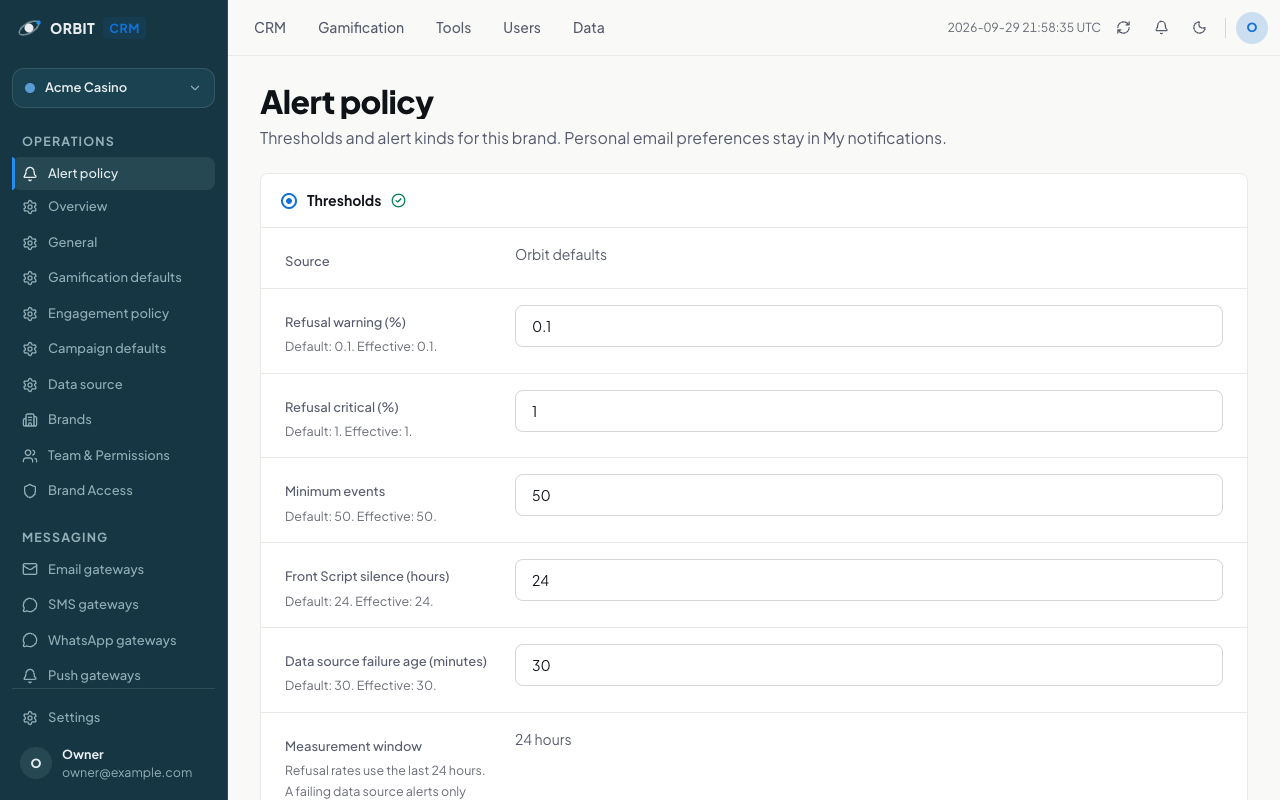
An Owner or a Manager can edit. Source says Brand policy after a save, or Orbit defaults when nothing is saved for the brand.
- Open Settings, then Operations, then Alert policy.
- Under Thresholds, set Refusal warning (%) and Refusal critical (%). Each accepts 0.01 to 100, with up to 2 decimals. The defaults are 0.1 and 1. Critical has to be at least the warning. If it is lower, the page says Critical threshold must be at least the warning threshold.
- Set Minimum events. Refusal rates are ignored until the last 24 hours contain at least this many events. The default is 50. The field accepts 1 to 1000000.
- Set Front Script silence (hours). The default is 24. The field accepts 1 to 720.
- Set Data source failure age (minutes). The default is 30. The field accepts 1 to 10080. A failing data source alerts only while it is running, when its last success is older than this age, or when it has never succeeded.
- Measurement window is fixed at 24 hours. Refusal rates use that window. A webhook alerts only after an automatic pause, which is not a percentage on this card.
- Click Save alert policy. The page says Saved.
Each row shows Default and Effective. Turning a kind off is a separate choice under Alert kinds.
Warning
Save alert policy stays off while a number is empty, out of range, or while critical is below the warning.
Tip
Open Alerts from the bell to see what these thresholds have already raised. Check now runs a detection pass. Nothing needs attention. means the pass found no open alert.