Appearance
An event pack shows what the brand can send, and what those events write onto a customer. Nothing is installed until you have seen what it adds and what it changes, and then pressed Install.
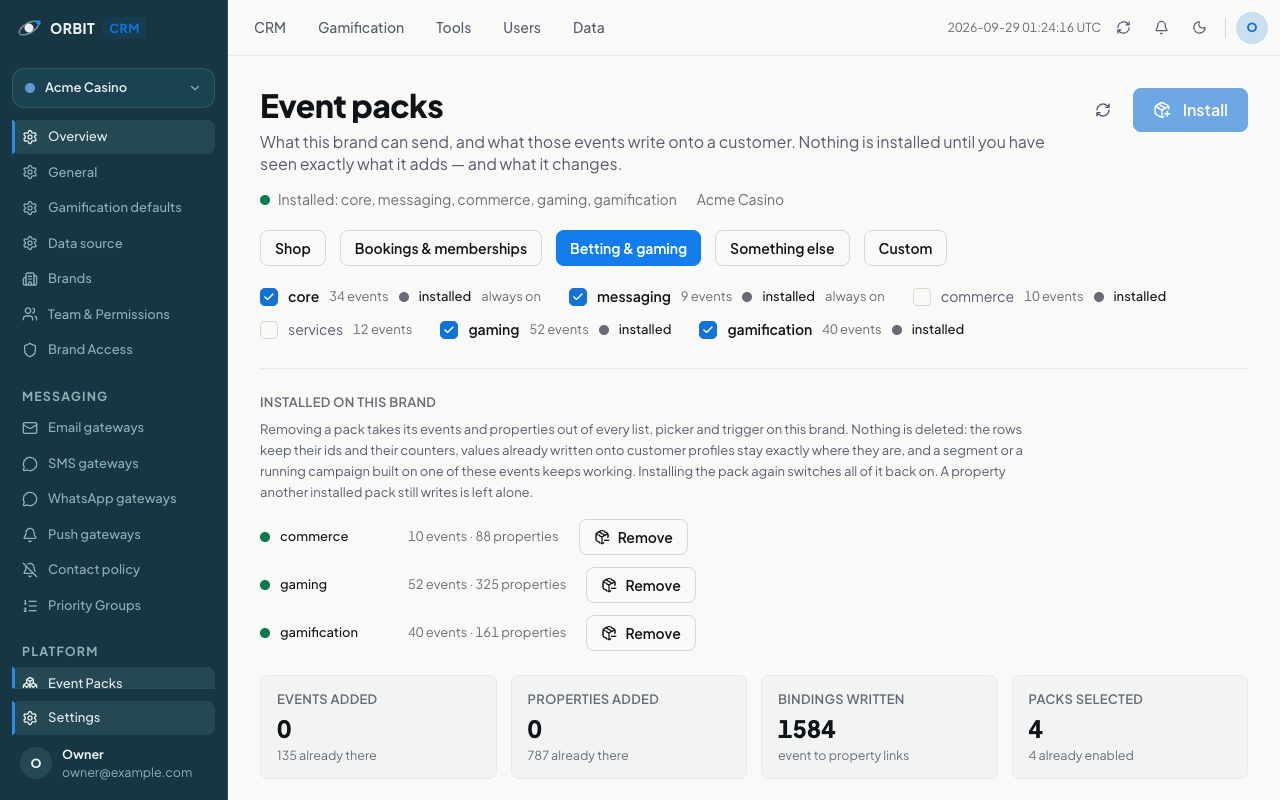
- Open Settings, then Platform, then Event Packs. The title is Event packs. The subtitle says nothing is installed until you have seen exactly what it adds — and what it changes.
- Pick a preset. The buttons are Shop, Bookings & memberships, Betting & gaming, Something else and Custom. Each button’s hint describes that preset. Betting & gaming is the one that includes wallet, bets, bonuses, safer-play state, missions, tournaments, mini games and the loyalty store. Custom is the base, then you pick the packs yourself.
- Tick the packs you want. A pack marked always on cannot be cleared. A pack already on the brand says installed. The count beside the name is how many events it holds.
- Read the tiles: Events added, Properties added, Bindings written and Packs selected. Open the Events tab and the Properties tab. The columns are Key, Name, Pack and On install. On install says what that row will do, including Adds when the row is new.
- If a property this brand invented would change value type, Install stays off until you tick Confirm these retypes. The line beside it says Yes, retype this property on install, or Yes, retype these N on install, with the count. The change is permanent.
- Press Install. While it runs, the button reads Installing…. The green line then counts events added, adopted and left alone, and the same for properties.
The header says No catalogue installed on this brand yet, or Installed: and the pack names. Refresh reloads the preview. If the packs are already installed and switched on, Install’s hint says these packs are already installed and switched on for this brand.
Removing a pack is separate. Under Installed on this brand, Remove asks you to confirm. The confirm says nothing is deleted. Yes, remove it hides the events and properties. Values already on customer profiles stay.
Warning
A row marked Adopts already exists as this brand’s own. Installing moves it into the pack for good. Removing the pack later leaves it there, hidden, rather than handing it back.