Appearance
A Quiz is a list of questions players answer on your site, under Games. Nothing is offered until you publish a run and games are on for the brand.
Before you start
An Owner or a Manager publishes the run and turns games on. Set Status to Active before you publish. The publish step refuses anything else with Set the status to Active before publishing.
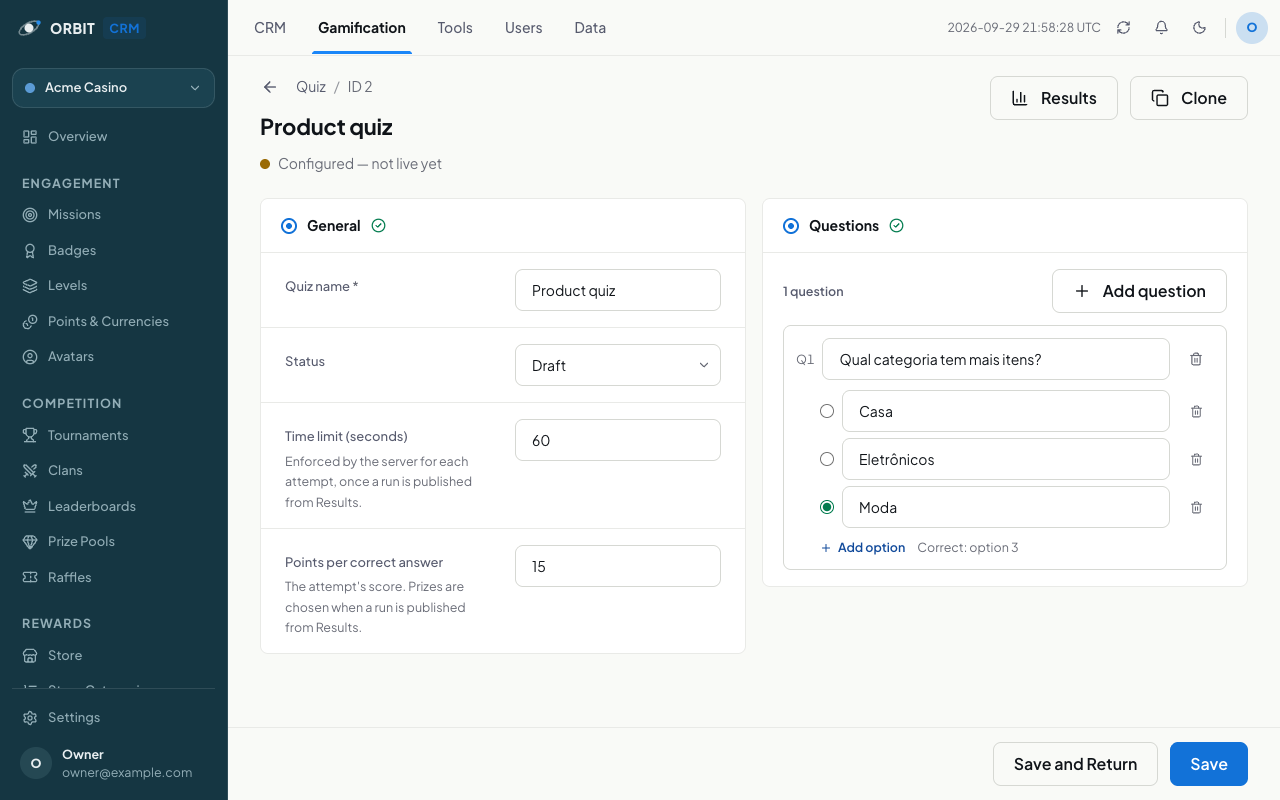
- Open Gamification, then Mini Games, then Quiz. Click Create.
- Under Quiz name, type the name. Set Status to Active.
- Set Time limit (seconds) between 10 seconds and 1 hour. The server enforces it on each attempt once a run is published.
- Set Points per correct answer. That is the attempt’s score. Prizes are chosen when you publish.
- Under Questions, click Add question. Type the question. Add at least two options, and use the radio Mark as the correct answer on the right one. Add option adds another choice. You can add up to 50 questions, and 6 options on each.
- Click Save. Open Results.
- If games are off, click Turn games on for this brand.
- Click Publish a run. Set Starts (UTC) and Ends (UTC). No new plays start after the end.
- Set Prize release to Approval or Automatic. Approval means an Owner or a Manager releases each prize. Automatic releases it as soon as it is won.
- Set Attempts per player. If Winning the quiz has a prize, fill Correct answers to win (out of the questions you saved). Choose No prize, Points or Bonus for that slot. A bonus needs Choose a bonus template.
- Click Publish. Publishing freezes these rules. Change them later by publishing a new revision.
On the site, the player opens Games, sees the Quiz name, the question count and the time limit, and clicks Start. Each question shows its options. Time left counts down. The screen then shows the number of correct answers (for example 3 / 5 correct), Score, and the prize status when a prize was won. There is no Result line and no No prize this time. message on a Quiz.
The editor shows Live while that run is open, games are on, and the end is still ahead.
Warning
A prize with no Correct answers to win will not publish. The winning number cannot be higher than the number of questions. Each question needs text, two non-empty options, and a correct option.